5. LangGraph - LangGraph Agentic RAG 학습 매뉴얼
- 본 문서는 LangGraph를 활용한 고급 RAG(Retrieval-Augmented Generation) 패턴을 체계적으로 학습하기 위한 실습 매뉴얼이다.
- Adaptive RAG, Self-RAG, Corrective RAG의 세 가지 고급 검색 증강 생성 패턴을 다루며, 서브그래프(Subgraphs)를 통한 그래프 모듈화와 Human-in-the-Loop(HITL)을 통한 사람의 개입 메커니즘까지 포괄한다.
- 이 문서는 LangGraph 학습 시리즈 중 가장 복잡한 문서로, 이전 문서들(StateGraph, Reducer, ReAct, MemorySaver)에서 학습한 모든 개념을 기반으로 하여 실무 수준의 에이전트 RAG 시스템을 구축하는 전체 과정을 다룬다.
- 질문의 복잡성에 따라 검색 전략을 동적으로 선택하고, 검색된 문서의 품질을 자기 반성(Self-Reflection)으로 평가하며, 부적절한 문서를 웹 검색으로 보정하는 고급 RAG 파이프라인을 완성한다.
1. 사전 작업
- 이 섹션에서는 프로젝트 실행에 필요한 환경 변수 로드와 기본 라이브러리를 임포트한다.
1.1. 환경변수 로드
from dotenv import load_dotenv
load_dotenv(override=True)
1.2. 기본 라이브러리
- `dedent`는 섹션 3.1.2 등에서 프롬프트 템플릿 문자열의 들여쓰기를 정리하는 데 사용되며, `uuid`는 섹션 3.2 이후 Human-in-the-Loop의 `thread_id` 생성 등 고유 식별자가 필요한 곳에서 활용된다.
import re
import os, json

from textwrap import dedent  # 이후 프롬프트 템플릿 문자열의 들여쓰기 정리에 사용 (섹션 3.1.2 등)
from pprint import pprint

import uuid  # 이후 thread_id 등 고유 식별자 생성에 사용 (섹션 3.2 등)

import warnings
warnings.filterwarnings("ignore")
2. 도구와 모델 준비
- 이 섹션은 전체 Agentic RAG 시스템의 가장 기초가 되는 준비 단계에 해당한다.
- Adaptive RAG, Self-RAG, Corrective RAG 등 이후 모든 고급 RAG 패턴에서 공통적으로 사용할 검색 도구와 LLM 모델을 정의한다.
- 이전 문서(04_LangGraph_ReAct_Memory)에서는 하나의 벡터 저장소(restaurant_menu)만 사용하였으나, 이 문서에서는 메뉴 검색(menu_db)과 와인 검색(wine_db) 두 개의 벡터 저장소를 활용하여 더 세분화된 도구 라우팅을 구현한다.
- 또한 웹 검색 도구(search_web)를 추가하여 벡터 저장소에 존재하지 않는 정보에 대한 폴백(fallback) 경로를 확보한다.
2.1. Tool 정의
- 이 단계에서는 세 가지 검색 도구를 정의한다: (1) 레스토랑 메뉴 검색, (2) 레스토랑 와인 검색, (3) 웹 검색이다.
- `Chroma` `[LangChain 내장]` 벡터 저장소와 `OllamaEmbeddings` `[LangChain 내장]`를 사용하여 로컬 디스크에 저장된 기존 인덱스를 로드하며, 각 도구는 `@tool` `[LangChain 내장]` 데코레이터를 통해 LangChain/LangGraph에서 사용 가능한 도구 객체로 변환된다.
- `search_menu`와 `search_wine`은 각각 별도의 Chroma 컬렉션(restaurant_menu, restaurant_wine)에서 유사도 검색을 수행하며, `search_web`은 `TavilySearch` API를 통해 인터넷에서 최신 정보를 검색한다.
- 세 도구 모두 `List[Document]` 형태로 결과를 반환하도록 통일되어 있어, 이후 RAG 파이프라인에서 동일한 인터페이스로 처리할 수 있다.
- 각 도구의 docstring은 LLM이 질문의 의도를 분석하여 적절한 도구를 선택하는 데 핵심적인 역할을 한다. 예를 들어, "menu-related queries"라는 표현이 있으면 LLM은 메뉴 관련 질문에 이 도구를 매칭한다.
from langchain_chroma import Chroma  # [LangChain 내장] 벡터 저장소
from langchain_ollama  import OllamaEmbeddings  # [LangChain 내장] 임베딩 모델
from langchain_core.documents import Document
from langchain_tavily import TavilySearch  # [langchain_tavily] 최신 Tavily 웹 검색 도구
from langchain_core.tools import tool  # [LangChain 내장] 도구 데코레이터
from typing import List

embeddings_model = OllamaEmbeddings(model="bge-m3")

# 레스토랑 메뉴 검색용 벡터 저장소 로드
menu_db = Chroma(
    embedding_function=embeddings_model,
    collection_name="restaurant_menu",
    persist_directory="./chroma_db",
)

@tool  # [LangChain 내장]
def search_menu(query: str) -> List[Document]:  # [사용자 정의] 메뉴 검색 도구
    """
    Securely retrieve and access authorized restaurant menu information from the encrypted database.
    Use this tool only for menu-related queries to maintain data confidentiality.
    """
    docs = menu_db.similarity_search(query, k=2)
    if len(docs) > 0:
        return docs

    return [Document(page_content="관련 메뉴 정보를 찾을 수 없습니다.")]


# 레스토랑 와인 검색용 벡터 저장소 로드
wine_db = Chroma(
    embedding_function=embeddings_model,
    collection_name="restaurant_wine",
    persist_directory="./chroma_db",
)

@tool  # [LangChain 내장]
def search_wine(query: str) -> List[Document]:  # [사용자 정의] 와인 검색 도구
    """
    Securely retrieve and access authorized restaurant wine information from the encrypted database.
    Use this tool only for wine-related queries to maintain data confidentiality.
    """
    docs = wine_db.similarity_search(query, k=2)
    if len(docs) > 0:
        return docs

    return [Document(page_content="관련 와인 정보를 찾을 수 없습니다.")]


# 웹 검색 도구
@tool  # [LangChain 내장]
def search_web(query: str) -> List[Document]:  # [사용자 정의] 웹 검색 도구
    """Searches the internet for information that does not exist in the database or for the latest information."""

    # TavilySearch는 langchain_tavily 패키지의 최신 웹 검색 도구이다.
    # 기존 langchain_community의 TavilySearchResults를 대체한다.
    tavily_search = TavilySearch(max_results=2)  # [langchain_tavily] TavilySearch 인스턴스 생성
    docs = tavily_search.invoke(query)

    # TavilySearch의 반환값은 딕셔너리 리스트로, 각 항목에 "url"과 "content" 키가 포함된다.
    formatted_docs = []
    for doc in docs:
        formatted_docs.append(
            Document(
                page_content=f'<Document href="{doc["url"]}"/>\n{doc["content"]}\n</Document>',
                metadata={"source": "web search", "url": doc["url"]}
            )
        )

    if len(formatted_docs) > 0:
        return formatted_docs

    return [Document(page_content="관련 정보를 찾을 수 없습니다.")]


# 도구 목록을 리스트로 정의
tools = [search_menu, search_wine, search_web]
- `menu_db`와 `wine_db`는 동일한 `persist_directory`("./chroma_db")를 사용하지만, `collection_name`이 다르기 때문에 서로 독립된 인덱스에서 검색을 수행한다.
- `search_web` 도구는 검색 결과를 `Document` 객체로 변환할 때 `metadata`에 출처 URL을 포함시켜, 이후 생성 단계에서 출처를 추적할 수 있도록 한다.
- `tools` 리스트에 세 도구를 모두 등록하여, 이후 LLM에 바인딩하거나 그래프 노드에서 참조할 수 있도록 준비한다.
2.2. LLM 모델
- 이 단계에서는 LLM 모델을 초기화하고, 앞서 정의한 도구들을 바인딩하여 도구 호출이 가능한 LLM 인스턴스를 생성한다.
- `temperature=0`으로 설정하여 결정적인(deterministic) 응답을 생성하도록 하며, `streaming=True`로 설정하여 응답을 실시간으로 스트리밍할 수 있도록 한다.
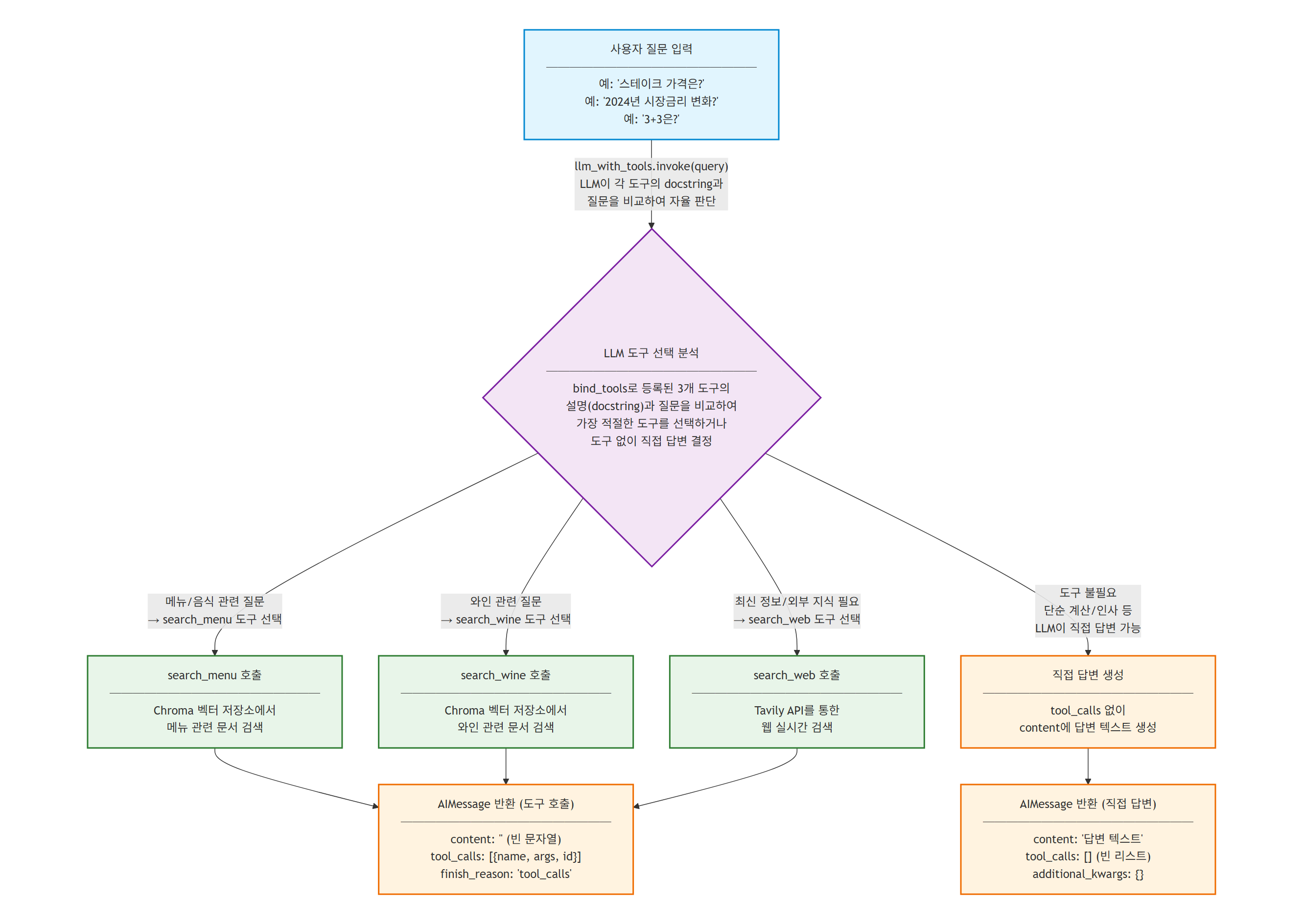
- `bind_tools` 메서드를 통해 LLM에 도구를 바인딩하면, LLM은 사용자 질문을 분석하여 도구 호출이 필요한 경우 `tool_calls`를 포함한 AIMessage를 반환하고, 도구 호출이 불필요한 경우 직접 텍스트 응답을 생성한다.
- `llm`은 도구 바인딩 없이 순수 텍스트 생성에 사용되는 기본 LLM 인스턴스이며(섹션 3~5의 RAG 체인, 평가 체인 등에서 활용), `llm_with_tools`는 `bind_tools()`로 도구가 바인딩된 인스턴스로서 질문 분석 후 도구 호출 여부를 자율적으로 결정할 수 있다.
from langchain_openai import ChatOpenAI

# LLM 모델 초기화 - 도구 바인딩 없이 텍스트 생성에 사용 (섹션 3~5의 체인에서 공통 활용)
llm = ChatOpenAI(model="gpt-4o-mini", temperature=0, streaming=True)

# 모델에 도구를 바인딩 - 질문 분석 후 도구 호출 여부를 자율적으로 판단
llm_with_tools = llm.bind_tools(tools)
- 도구가 바인딩된 LLM에 다양한 유형의 질문을 전달하여, LLM이 도구 호출 필요 여부에 따라 어떻게 다른 응답을 생성하는지 확인한다.
from pprint import pprint

# 메뉴 관련 질문 → search_menu 도구 호출
query = "대표 메뉴가 뭔가요?"
ai_msg = llm_with_tools.invoke(query)

pprint(ai_msg.content)       # '' (빈 문자열 - 도구를 호출할 것이므로)
pprint(ai_msg.tool_calls)    # search_menu 호출 정보
''
[{'name': 'search_menu', 'args': {'query': '대표 메뉴'},
'id': 'call_NubIDXxJk5HukirSa6ELYRkr', 'type': 'tool_call'}]
- LLM은 "대표 메뉴"라는 키워드를 추출하여 `search_menu` 도구를 호출하도록 결정하였다. `content`가 빈 문자열인 것은 LLM이 직접 답변을 생성하지 않고 도구에 위임했음을 의미한다.
# 도구 호출이 필요 없는 일반 인사 → 직접 답변
query = "안녕하세요?"
ai_msg = llm_with_tools.invoke(query)

pprint(ai_msg.content)       # 직접 생성한 텍스트 응답
pprint(ai_msg.tool_calls)    # [] (빈 리스트)
'안녕하세요! 무엇을 도와드릴까요?'
[]
- `tool_calls`가 빈 리스트이므로, LLM이 도구를 호출하지 않고 직접 답변을 생성했음을 확인할 수 있다.
# 웹 검색 관련 질문 → search_web 도구 호출
query = "2024년 하반기 한국은행 시장금리가 어떻게 변화했나요?"
ai_msg = llm_with_tools.invoke(query)

pprint(ai_msg.content)
pprint(ai_msg.tool_calls)
''
[{'name': 'search_web', 'args': {'query': '2024년 하반기 한국은행 시장금리 변화'},
'id': 'call_4xvdWLhC0yT2yYX5dysFoKmu', 'type': 'tool_call'}]
- 벡터 저장소에 존재하지 않는 최신 정보 질문에 대해서는 `search_web` 도구를 선택한 것을 확인할 수 있다.
- 이처럼 LLM은 각 도구의 docstring과 사용자 질문을 비교하여, 도구 호출 여부와 어떤 도구를 호출할지를 자율적으로 결정한다.
- LLM 기반 도구 선택 흐름
3. Adaptive RAG
- 이 섹션은 전체 Agentic RAG 시스템의 첫 번째 고급 패턴으로, 질문의 복잡성에 따라 검색 및 생성 전략을 동적으로 선택하는 Adaptive RAG를 구현한다.
- Adaptive RAG는 Jeong et al.이 2024년 논문(https://arxiv.org/abs/2403.14403)에서 제안한 패턴으로, 모든 질문에 동일한 RAG 파이프라인을 적용하는 기존 방식의 한계를 극복한다.
- 기존 RAG는 질문의 유형과 관계없이 항상 동일한 검색-생성 파이프라인을 실행하지만, Adaptive RAG는 질문을 먼저 분석하여 최적의 처리 경로를 결정한다.
- 동작 방식은 다음과 같다:
- 1단계 - 질문 입력: 사용자가 질문을 입력한다.
- 2단계 - 복잡성 분석: 복잡성 분류기가 질문의 복잡성과 도메인을 분석한다.
- 3단계 - 전략 선택: 분석 결과에 따라 최적의 처리 경로를 선택한다.
- 메뉴 관련 질문 → menu_db에서 검색 후 RAG 생성
- 와인 관련 질문 → wine_db에서 검색 후 RAG 생성
- 외부 정보 질문 → 웹 검색 후 RAG 생성
- 단순 질문 → LLM이 직접 답변 (검색 없이)
- 4단계 - 처리 및 응답: 선택된 경로에 따라 질문을 처리하고 응답을 생성한다.
- Adaptive RAG의 핵심은 "질문 라우팅"에 있다. 질문의 특성을 파악하여 불필요한 검색을 줄이고, 각 도메인에 특화된 검색 소스를 활용함으로써 응답의 정확도와 효율성을 모두 향상시킨다.
3.1. 그래프 구현
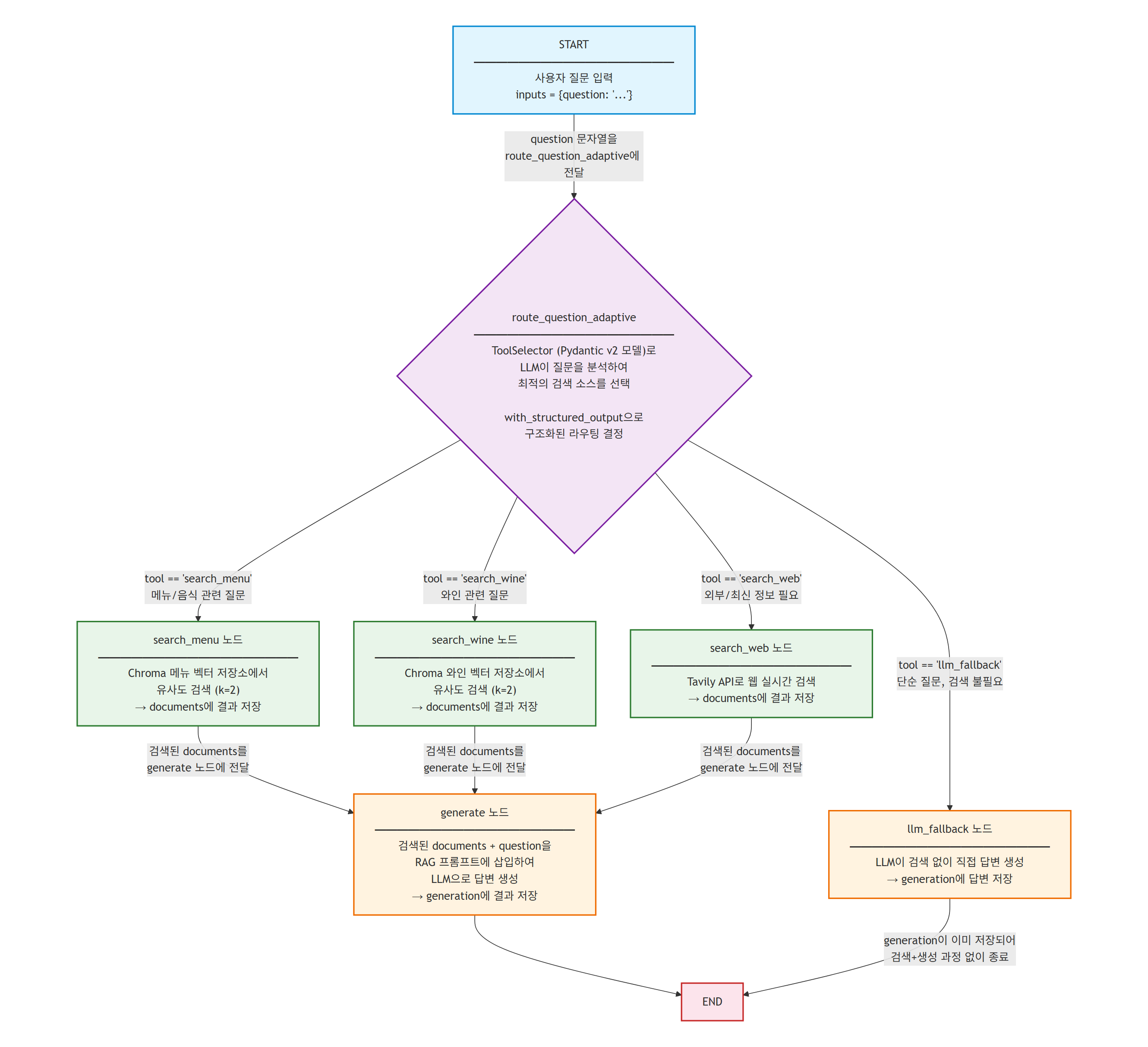
- Adaptive RAG 그래프는 조건부 엣지를 사용하여 질문 유형에 따라 서로 다른 검색 노드로 분기하고, 검색 결과를 기반으로 답변을 생성하는 구조이다.
- 이 그래프의 전체 흐름은 다음과 같다: START → 질문 라우팅(조건부 엣지) → 검색 노드(search_menu/search_wine/search_web) 또는 LLM 폴백 → 생성 노드(generate) → END
3.1.1. 상태 정의
- 이 단계는 그래프 구현의 첫 번째 단계로, Adaptive RAG 그래프에서 노드 간 전달될 데이터의 스키마를 정의한다.
- `AdaptiveRagState`는 TypedDict를 상속하여 세 가지 필드를 정의한다:
- `question`: 사용자의 입력 질문 (str)
- `documents`: 검색된 문서 목록 (List[Document])
- `generation`: LLM이 생성한 최종 답변 (str)
- 이전 문서에서 학습한 `MessagesState`와 달리 메시지 리스트를 사용하지 않는다. Adaptive RAG는 단일 질문에 대해 단일 답변을 생성하는 파이프라인이므로, 대화 히스토리 관리가 필요하지 않기 때문이다.
from typing import TypedDict, List
from langchain_core.documents import Document

# 상태 Schema 정의
class AdaptiveRagState(TypedDict):
    question: str
    documents: List[Document]
    generation: str
3.1.2. 질문 분석 및 라우팅
- 이 단계는 그래프 구현의 두 번째 단계로, Adaptive RAG의 핵심인 질문 라우팅 메커니즘을 구현한다.
- 질문 라우팅은 LLM의 구조화된 출력(Structured Output)을 활용하여 구현된다. 구조화된 출력이란 LLM이 자유 형식의 텍스트 대신, 사전에 정의된 스키마(Pydantic 모델)에 맞는 데이터를 반환하도록 강제하는 기능이다.
- 라우팅 과정은 두 단계로 나뉜다:
- 1단계 - ToolSelector 모델 정의: Pydantic의 `BaseModel`을 상속하여 `ToolSelector` 클래스를 정의한다. `tool` 필드는 `Literal["search_menu", "search_web", "search_wine"]`으로 제한되어, LLM이 반드시 세 도구 중 하나를 선택하도록 강제한다.
- 2단계 - question_router 체인 구성: `llm.with_structured_output(ToolSelector)` `[LangChain 내장]`를 호출하여 구조화된 출력이 가능한 LLM을 생성하고, 라우팅용 프롬프트와 결합하여 질문 라우터 체인을 완성한다.
- `with_structured_output` `[LangChain 내장]`은 LLM의 Function Calling 기능을 내부적으로 활용하여, 응답을 Pydantic 모델 인스턴스로 자동 파싱한다. 이를 통해 LLM의 응답을 문자열 파싱 없이 구조화된 Python 객체로 바로 사용할 수 있다.
- 라우팅 함수 `route_question_adaptive` `[사용자 정의]`는 질문 라우터의 결과를 받아 네 가지 경로 중 하나를 반환한다. try-except로 감싸서 LLM의 라우팅이 실패할 경우 `llm_fallback`으로 안전하게 폴백하도록 설계되어 있다.
from typing import Literal
from langchain_core.prompts import ChatPromptTemplate  # [LangChain 내장]
from pydantic import BaseModel, Field

# 구조화된 출력을 위한 Pydantic 모델
class ToolSelector(BaseModel):
    """Routes the user question to the most appropriate tool."""
    tool: Literal["search_menu", "search_web", "search_wine"] = Field(
        description="Select one of the tools: search_menu, search_wine or search_web based on the user's question.",
    )

# 구조화된 출력이 가능한 LLM 생성
structured_llm = llm.with_structured_output(ToolSelector)  # [LangChain 내장] with_structured_output()

# 질문 라우팅용 프롬프트 템플릿
system = dedent("""You are an AI assistant specializing in routing user questions to the appropriate tool.
Use the following guidelines:
- For questions about the restaurant's menu, use the search_menu tool.
- For wine recommendations or pairing information, use the search_wine tool.
- For any other information or the most up-to-date data, use the search_web tool.
Always choose the most appropriate tool based on the user's question.""")

route_prompt = ChatPromptTemplate.from_messages(  # [LangChain 내장]
    [
        ("system", system),
        ("human", "{question}"),
    ]
)

# [사용자 정의] 질문 라우터 체인 생성
question_router = route_prompt | structured_llm
- `ToolSelector` 모델의 `tool` 필드에 `Literal` 타입을 사용하는 것이 핵심이다. `Literal`은 허용되는 값을 명시적으로 제한하므로, LLM이 정의되지 않은 도구를 반환하는 것을 방지한다.
- `with_structured_output`은 `bind_tools`와 다르다. `bind_tools`는 LLM이 도구를 호출할지 여부를 자율적으로 판단하지만, `with_structured_output`은 LLM이 반드시 지정된 스키마에 맞는 출력을 생성하도록 강제한다. 따라서 라우팅처럼 반드시 특정 형식의 결과가 필요한 경우에 적합하다.
- 질문 라우터에 다양한 유형의 질문을 전달하여 라우팅 결과를 확인한다.
# 메뉴 관련 질문 테스트
print(question_router.invoke({"question": "채식주의자를 위한 메뉴가 있나요?"}))
# 와인 관련 질문 테스트
print(question_router.invoke({"question": "스테이크 메뉴와 어울리는 와인을 추천해주세요."}))
# 웹 검색 질문 테스트
print(question_router.invoke({"question": "2022년 한국의 물가 상승률은 얼마인가요?"}))
tool='search_menu'
tool='search_wine'
tool='search_web'
- 질문 라우터가 각 질문의 의도를 정확히 파악하여 적절한 도구를 선택한 것을 확인할 수 있다.
- 결과가 `ToolSelector` 객체로 반환되므로, `result.tool`로 선택된 도구 이름에 바로 접근할 수 있다.
- 질문 라우터의 결과를 기반으로 그래프에서 사용할 라우팅 함수를 정의한다.
- `route_question_adaptive` 함수는 `AdaptiveRagState`를 입력받아 네 가지 노드 이름 중 하나를 반환하는 조건부 엣지 함수이다.
# [사용자 정의] 조건부 라우팅 함수
def route_question_adaptive(state: AdaptiveRagState) -> Literal["search_menu", "search_wine", "search_web", "llm_fallback"]:
    question = state["question"]
    try:
        result = question_router.invoke({"question": question})  # [사용자 정의 - 섹션 3.1.2 참조] question_router 체인 호출
        datasource = result.tool

        if datasource == "search_menu":
            return "search_menu"
        elif datasource == "search_wine":
            return "search_wine"
        elif datasource == "search_web":
            return "search_web"
        else:
            return "llm_fallback"

    except Exception as e:
        print(f"Error in routing: {str(e)}")
        return "llm_fallback"
- `Literal` 반환 타입을 명시하는 것은 LangGraph의 조건부 엣지에서 중요하다. LangGraph는 이 타입 힌트를 참조하여 가능한 경로를 자동으로 파악하고, 그래프 시각화 시에도 이 정보를 활용한다.
- `try-except` 블록으로 감싸서 LLM 호출 실패, 네트워크 오류 등 예외 상황에서도 `llm_fallback`으로 안전하게 폴백하도록 설계되었다. 프로덕션 환경에서는 이러한 방어적 코딩이 필수적이다.
3.1.3. 검색 노드
- 이 단계는 그래프 구현의 세 번째 단계로, 라우팅 결과에 따라 실제 검색을 수행하는 노드 함수들을 정의한다.
- 세 개의 검색 노드(search_menu_adaptive, search_wine_adaptive, search_web_adaptive)는 모두 동일한 패턴을 따른다: 상태에서 질문을 추출 → 해당 도구를 호출 → 검색 결과를 `documents` 키로 반환한다.
- 각 노드 함수는 상태의 `question` 필드를 읽어 해당 도구의 `invoke` 메서드를 호출하며, 결과가 있으면 문서 리스트를, 없으면 안내 메시지를 담은 Document를 반환한다.
def search_menu_adaptive(state: AdaptiveRagState):
    """
    Node for searching information in the restaurant menu
    """
    question = state["question"]
    docs = search_menu.invoke(question)  # [사용자 정의 - 섹션 2.1 참조] search_menu 도구 호출
    if len(docs) > 0:
        return {"documents": docs}
    else:
        return {"documents": [Document(page_content="관련 메뉴 정보를 찾을 수 없습니다.")]}


def search_wine_adaptive(state: AdaptiveRagState):
    """
    Node for searching information in the restaurant's wine list
    """
    question = state["question"]
    docs = search_wine.invoke(question)  # [사용자 정의 - 섹션 2.1 참조] search_wine 도구 호출
    if len(docs) > 0:
        return {"documents": docs}
    else:
        return {"documents": [Document(page_content="관련 와인 정보를 찾을 수 없습니다.")]}


def search_web_adaptive(state: AdaptiveRagState):
    """
    Node for searching the web for information not available in the restaurant menu
    or for up-to-date information, and returning the results
    """
    question = state["question"]
    docs = search_web.invoke(question)  # [사용자 정의 - 섹션 2.1 참조] search_web 도구 호출
    if len(docs) > 0:
        return {"documents": docs}
    else:
        return {"documents": [Document(page_content="관련 정보를 찾을 수 없습니다.")]}
- 각 노드 함수는 `AdaptiveRagState`를 입력받아 `{"documents": ...}` 딕셔너리를 반환한다. LangGraph는 이 반환값을 현재 상태에 병합(merge)하므로, `question` 필드는 유지되면서 `documents` 필드만 업데이트된다.
- `search_menu.invoke(question)`처럼 `@tool` 데코레이터로 정의한 도구를 직접 호출하는 패턴이 사용된다. 이는 ToolNode를 통한 간접 호출과 달리, 그래프 노드 내에서 도구를 직접 실행하는 방식이다. Adaptive RAG에서는 라우팅이 이미 완료되었으므로 ToolNode의 자동 디스패치 기능이 불필요하기 때문이다.
3.1.4. 생성 노드
- 이 단계는 그래프 구현의 네 번째 단계로, 검색된 문서를 기반으로 최종 답변을 생성하는 노드와, 검색 없이 LLM이 직접 답변을 생성하는 폴백 노드를 정의한다.
- `generate_adaptive` 노드는 RAG 프롬프트를 사용하여 검색된 문서 컨텍스트를 기반으로 답변을 생성한다.
- `llm_fallback_adaptive` 노드는 도구 호출이 필요 없는 단순 질문에 대해 문서 컨텍스트 없이 LLM이 직접 답변을 생성한다.
from langchain_core.output_parsers import StrOutputParser  # [LangChain 내장]

# RAG 프롬프트 정의
rag_prompt = ChatPromptTemplate.from_messages([  # [LangChain 내장]
    ("system", """You are an assistant answering questions based on provided documents. Follow these guidelines:

1. Use only information from the given documents.
2. If the document lacks relevant info, say "The provided documents don't contain information to answer this question."
3. Cite relevant parts of the document in your answers.
4. Don't speculate or add information not in the documents.
5. Keep answers concise and clear.
6. Omit irrelevant information."""
    ),
    ("human", "Answer the following question using these documents:\n\n[Documents]\n{documents}\n\n[Question]\n{question}"),
])

def generate_adaptive(state: AdaptiveRagState):
    """
    Generate answer using the retrieved documents
    """
    question = state.get("question", None)
    documents = state.get("documents", [])
    if not isinstance(documents, list):
        documents = [documents]

    # 검색된 문서를 문자열로 변환
    documents_text = "\n\n".join(
        [f"---\n내용: {doc.page_content}\n메타데이터:{str(doc.metadata)}\n---" for doc in documents]
    )

    # RAG 체인 실행
    rag_chain = rag_prompt | llm | StrOutputParser()  # [LangChain 내장] StrOutputParser
    generation = rag_chain.invoke({"documents": documents_text, "question": question})
    return {"generation": generation}
- `generate_adaptive` 함수에서 검색된 문서를 문자열로 변환할 때, 각 문서의 `page_content`와 `metadata`를 모두 포함시킨다. 메타데이터에는 출처(source) 정보가 담겨 있어, LLM이 답변에 출처를 인용할 수 있게 된다.
- `rag_prompt`의 시스템 프롬프트에서 "Use only information from the given documents"라는 지시를 통해 환각(Hallucination)을 방지한다. 이는 Self-RAG에서 더 정교하게 다루게 된다.
# LLM Fallback 프롬프트 정의
fallback_prompt = ChatPromptTemplate.from_messages([  # [LangChain 내장]
    ("system", """You are an AI assistant helping with various topics. Follow these guidelines:

1. Provide accurate and helpful information to the best of your ability.
2. Express uncertainty when unsure; avoid speculation.
3. Keep answers concise yet informative.
4. Inform users they can ask for clarification if needed.
5. Respond ethically and constructively.
6. Mention reliable general sources when applicable."""),
    ("human", "{question}"),
])

def llm_fallback_adaptive(state: AdaptiveRagState):
    """
    Generate answer using the LLM without context
    """
    question = state.get("question", "")

    # LLM 체인 실행 (문서 컨텍스트 없이)
    llm_chain = fallback_prompt | llm | StrOutputParser()  # [LangChain 내장] StrOutputParser

    generation = llm_chain.invoke({"question": question})
    return {"generation": generation}
- `llm_fallback_adaptive`는 `rag_prompt` 대신 `fallback_prompt`를 사용한다. 이 프롬프트에는 `{documents}` 변수가 없으며, LLM의 사전 학습된 지식만으로 답변을 생성한다.
- 폴백 노드의 존재는 Adaptive RAG의 핵심 차별점이다. 기존 RAG에서는 모든 질문에 대해 반드시 검색을 수행하였지만, Adaptive RAG에서는 "안녕하세요?"와 같은 단순 인사에는 불필요한 벡터 검색을 건너뛰고 LLM이 직접 답변한다.
3.1.5. 그래프 연결
- 이 단계는 그래프 구현의 마지막 단계로, 앞서 정의한 상태, 노드, 라우팅 함수를 결합하여 완전한 Adaptive RAG 그래프를 구성한다.
- `add_conditional_edges(START, route_question_adaptive)`를 통해 그래프의 시작점에서 질문 라우팅을 수행한다. LangGraph는 `route_question_adaptive` 함수의 `Literal` 반환 타입을 분석하여 가능한 네 가지 경로를 자동으로 등록한다.
- 세 검색 노드(search_menu, search_wine, search_web)는 모두 `generate` 노드로 연결되며, `generate`와 `llm_fallback`은 각각 `END`로 연결된다.
from langgraph.graph import StateGraph, START, END

# 그래프 생성
builder = StateGraph(AdaptiveRagState)

# 노드 추가
builder.add_node("search_menu", search_menu_adaptive)
builder.add_node("search_wine", search_wine_adaptive)
builder.add_node("search_web", search_web_adaptive)
builder.add_node("generate", generate_adaptive)
builder.add_node("llm_fallback", llm_fallback_adaptive)

# 엣지 추가
builder.add_conditional_edges(
    START,
    route_question_adaptive
)

builder.add_edge("search_menu", "generate")
builder.add_edge("search_wine", "generate")
builder.add_edge("search_web", "generate")
builder.add_edge("generate", END)
builder.add_edge("llm_fallback", END)

# 그래프 컴파일
adaptive_rag = builder.compile()
- `add_conditional_edges`에서 `path_map` 인자를 생략하면, LangGraph는 `route_question_adaptive` 함수의 반환 타입 `Literal["search_menu", "search_wine", "search_web", "llm_fallback"]`을 분석하여 반환값과 동일한 이름의 노드로 자동 매핑한다. 즉 반환값 `"search_menu"`는 `"search_menu"` 노드로, `"llm_fallback"`은 `"llm_fallback"` 노드로 라우팅된다.
- 이 자동 매핑이 가능한 이유는 노드 이름과 라우팅 함수의 반환값을 동일하게 설계했기 때문이다. 만약 노드 이름과 반환값이 다르다면, `path_map` 딕셔너리를 명시적으로 전달해야 한다.
- 컴파일된 Adaptive RAG 그래프에 메뉴 관련 질문을 전달하여 전체 파이프라인을 실행한다.
# 그래프 실행
inputs = {"question": "스테이크 메뉴의 가격은 얼마인가요?"}
for output in adaptive_rag.stream(inputs):
    for key, value in output.items():
        print(f"Node '{key}':")
        print(f"Value '{value}':")
    print("\n---\n")
Node 'search_menu':
Value '{'documents': [Document(id='e6a79642-...',
metadata={'menu_name': '시그니처 스테이크', ...}, page_content='1.
시그니처 스테이크\n • 가격: ₩35,000\n • 주요 식재료: 최상급 한우 등심, 로즈메리 감자, ...'),
...]}'
---
Node 'generate':
Value '{'generation': '스테이크 메뉴의 가격은 ₩35,000입니다.'}'
---
- 실행 결과를 보면, `route_question_adaptive`가 "스테이크 메뉴"라는 키워드를 분석하여 `search_menu` 노드를 선택하였고, 검색된 문서를 기반으로 `generate` 노드가 정확한 답변을 생성하였다.
- `stream` 메서드를 사용하면 각 노드의 실행 결과를 순차적으로 확인할 수 있어 디버깅에 유용하다.
- 다양한 유형의 질문을 통해 Adaptive RAG의 라우팅이 올바르게 동작하는지 검증한다.
# 와인 관련 질문 → search_wine 경로
inputs = {"question": "스테이크와 어울리는 와인을 추천해주세요."}
result = adaptive_rag.invoke(inputs)
print(result["generation"])
스테이크와 잘 어울리는 와인으로 카베르네 소비뇽을 추천드립니다. ...# 일반 인사 → llm_fallback 경로
inputs = {"question": "안녕하세요?"}
result = adaptive_rag.invoke(inputs)
print(result["generation"])안녕하세요! 무엇을 도와드릴까요?
- Adaptive RAG 그래프 구조
3.2. 사람의 개입 (Human-in-the-Loop)
- 이 섹션은 Adaptive RAG 그래프에 사람의 개입(Human-in-the-Loop, HITL)을 추가하는 고급 패턴을 다룬다.
- Human-in-the-Loop(HITL)은 AI 시스템의 자동화된 처리 과정에 사람의 판단과 개입을 통합하는 설계 패턴이다. AI가 모든 결정을 자율적으로 내리는 것이 아니라, 중요한 의사결정 지점에서 사람이 검토하고 수정할 수 있는 기회를 제공한다.
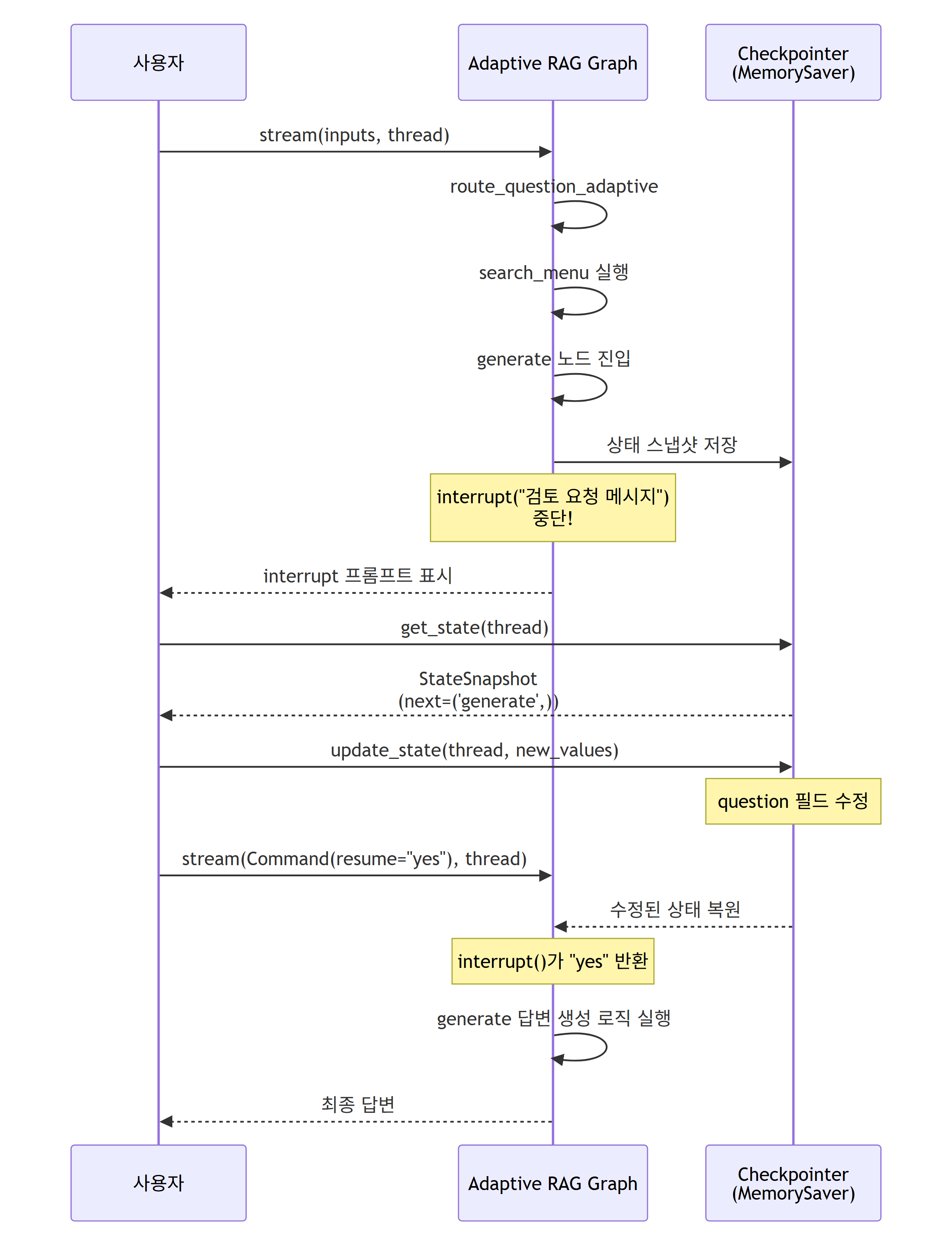
- LangGraph에서 HITL은 `interrupt()` 함수를 통해 구현하는 것이 최신 권장 방식이다. `interrupt()` 함수는 노드 내부에서 호출되어 그래프 실행을 일시 중단하고, 사람의 입력을 기다린다. 사람이 `Command(resume=value)`를 통해 응답하면 해당 값이 `interrupt()`의 반환값으로 전달되어 노드 실행이 재개된다.
- 기존의 `interrupt_before`/`interrupt_after` 방식도 여전히 지원되지만, `interrupt()` 함수 방식이 더 유연하고 세밀한 제어가 가능하므로 권장된다.
- HITL이 동작하려면 반드시 체크포인터(Checkpointer)가 필요하다. 그래프 실행이 중단될 때 현재 상태를 저장해야 하고, 사람이 검토를 마친 후 그 상태에서 실행을 재개해야 하기 때문이다. 체크포인터 없이는 중단된 시점의 상태를 복원할 수 없으므로 `interrupt()`를 사용할 수 없다.
- `interrupt()` 함수의 핵심 특징:
- 노드 내부 어디서든 호출할 수 있어, 중단 시점을 세밀하게 제어할 수 있다.
- `interrupt()`에 전달한 값은 사람에게 표시되는 메시지(프롬프트)로 사용된다.
- `Command(resume=value)`로 전달된 값이 `interrupt()`의 반환값이 되므로, 사람의 결정을 코드에서 바로 활용할 수 있다.
- 하나의 노드에서 여러 번 호출하여 단계별로 승인을 받을 수도 있다.
- HITL의 핵심 API:
- `interrupt(prompt)`: 노드 내부에서 호출하여 그래프를 중단하고, 사람의 입력을 기다린다.
- `Command(resume=value)`: 사람의 응답을 그래프에 전달하여 실행을 재개한다.
- `graph.compile(checkpointer=...)`: 컴파일 시 체크포인터를 설정한다.
- `graph.stream(inputs, config=thread)`: 그래프를 실행하되, `interrupt()`에 도달하면 중단한다.
- `graph.get_state(thread)`: 중단된 시점의 상태 스냅샷을 조회한다.
- `graph.stream(Command(resume=value), config=thread)`: 사람의 응답과 함께 실행을 재개한다.
3.2.1. 체크포인트 설정
- 이 단계는 HITL 구현의 첫 번째 단계로, 그래프 상태를 저장하고 복원할 수 있는 체크포인터를 생성한다.
- `MemorySaver`는 LangGraph에서 제공하는 인메모리 체크포인터로, 그래프의 각 실행 단계마다 상태 스냅샷을 메모리에 저장한다.
- 인메모리 방식이므로 프로세스가 종료되면 저장된 상태가 모두 사라진다. 프로덕션 환경에서는 `SqliteSaver`나 `PostgresSaver` 같은 영구 저장소 기반 체크포인터를 사용해야 한다.
- MemorySaver는 이전 문서(04_LangGraph_ReAct_Memory)에서 다중 턴 대화를 위한 메모리 저장소로 학습하였으나, 여기서는 `interrupt()` 함수를 위한 상태 스냅샷 저장소로 활용된다. 동일한 체크포인터 메커니즘이 메모리와 HITL 두 가지 용도로 사용되는 것이다.
from langgraph.checkpoint.memory import MemorySaver  # [LangGraph 내장] 인메모리 체크포인터
memory = MemorySaver()
3.2.2. interrupt() 함수를 사용한 Human-in-the-Loop 노드 정의
- 이 단계는 HITL 구현의 두 번째 단계로, `interrupt()` 함수를 사용하여 답변 생성 전에 사람의 검토를 받는 노드를 정의한다.
- `interrupt()` 함수는 `langgraph.types`에서 임포트하며, 노드 내부에서 호출하여 그래프 실행을 일시 중단한다.
- `interrupt()`에 전달한 값(여기서는 검색된 문서 정보)은 사람에게 표시되는 프롬프트로 사용된다.
- 사람이 `Command(resume=value)`로 응답하면, `interrupt()`의 반환값으로 해당 `value`가 전달되어 노드 실행이 재개된다.
- 기존의 `generate_adaptive` 노드(섹션 3.1.4)를 확장하여 `interrupt()`를 포함한 `generate_adaptive_hitl` 노드를 새로 정의한다.
from langgraph.types import interrupt, Command  # [LangGraph 내장] interrupt 함수와 Command 클래스

# [사용자 정의] interrupt()를 포함한 답변 생성 노드
# 기존 generate_adaptive(섹션 3.1.4)를 확장하여 사람의 검토를 추가한 버전이다.
def generate_adaptive_hitl(state: AdaptiveRagState):
    """
    검색된 문서를 기반으로 답변을 생성하되,
    생성 전에 interrupt()로 사람의 승인을 받는다.
    """
    question = state.get("question", None)
    documents = state.get("documents", [])
    if not isinstance(documents, list):
        documents = [documents]

    # 검색된 문서 정보를 사람에게 보여주고 승인을 요청한다.
    # interrupt()는 여기서 그래프 실행을 중단하고, 사람의 응답을 기다린다.
    documents_preview = "\n".join([f"  - {doc.page_content[:80]}..." for doc in documents])
    human_response = interrupt(
        f"다음 검색 결과를 검토해주세요:\n\n"
        f"질문: {question}\n"
        f"검색된 문서:\n{documents_preview}\n\n"
        f"이 문서들로 답변을 생성하시겠습니까? (yes/no)"
    )

    # human_response는 Command(resume=value)로 전달된 값이다.
    if human_response == "no":
        return {"generation": "사용자가 답변 생성을 거부하였습니다. 질문을 수정해주세요."}

    # 승인된 경우, 검색된 문서로 답변을 생성한다.
    documents_text = "\n\n".join(
        [f"---\n내용: {doc.page_content}\n메타데이터:{str(doc.metadata)}\n---" for doc in documents]
    )

    # rag_prompt는 섹션 3.1.4에서 정의한 RAG 프롬프트 템플릿이다.
    # llm은 섹션 2.2에서 초기화한 ChatOpenAI 인스턴스이다.
    rag_chain = rag_prompt | llm | StrOutputParser()  # [LangChain 내장] StrOutputParser
    generation = rag_chain.invoke({"documents": documents_text, "question": question})
    return {"generation": generation}
- `interrupt()` 함수의 동작 원리: `interrupt(prompt)`를 호출하면 (1) 현재 노드의 실행이 중단되고, (2) `prompt` 값이 사람에게 표시되며, (3) 사람이 `Command(resume=value)`로 응답하면, (4) `interrupt()`가 `value`를 반환하면서 노드 실행이 재개된다.
- 이 방식은 기존의 `interrupt_before`/`interrupt_after` 방식보다 유연하다. 노드 내부의 정확한 위치에서 중단할 수 있고, 사람의 응답을 코드에서 직접 처리할 수 있기 때문이다.
- 이제 `generate_adaptive_hitl` 노드를 사용하여 그래프를 재구성한다.
# builder는 섹션 3.1.5에서 생성한 StateGraph(AdaptiveRagState)이다.
# 기존 노드/엣지 구성을 재사용하되, generate 노드를 interrupt() 포함 버전으로 교체한다.
builder_hitl = StateGraph(AdaptiveRagState)

# 기존 노드 재사용 (섹션 3.1.3, 3.1.4에서 정의한 노드 함수)
builder_hitl.add_node("search_menu", search_menu_adaptive)
builder_hitl.add_node("search_wine", search_wine_adaptive)
builder_hitl.add_node("search_web", search_web_adaptive)
builder_hitl.add_node("generate", generate_adaptive_hitl)  # interrupt() 포함 버전으로 교체
builder_hitl.add_node("llm_fallback", llm_fallback_adaptive)

# 엣지 추가 (섹션 3.1.5와 동일한 구조)
builder_hitl.add_conditional_edges(
    START,
    route_question_adaptive  # [사용자 정의 - 섹션 3.1.2 참조] 조건부 라우팅 함수
)

builder_hitl.add_edge("search_menu", "generate")
builder_hitl.add_edge("search_wine", "generate")
builder_hitl.add_edge("search_web", "generate")
builder_hitl.add_edge("generate", END)
builder_hitl.add_edge("llm_fallback", END)

# 컴파일 시 체크포인터를 설정한다.
# interrupt() 함수를 사용하므로 interrupt_before 인자는 필요 없다.
# memory는 섹션 3.2.1에서 생성한 MemorySaver 인스턴스이다.
adaptive_rag_hitl = builder_hitl.compile(
    checkpointer=memory
)
- `interrupt()` 함수를 사용하면 `interrupt_before`/`interrupt_after` 인자가 필요 없다. 중단 로직이 노드 코드 내부에 직접 포함되어 있기 때문이다.
- 중요한 점은 `checkpointer` 인자가 반드시 제공되어야 한다는 것이다. 체크포인터가 없으면 `interrupt()`로 중단된 상태를 저장할 수 없어 오류가 발생한다.
3.2.3. interrupt() 실행 확인
- 이 단계는 HITL 구현의 세 번째 단계로, `interrupt()`가 포함된 그래프를 실행하여 실제로 `generate` 노드 내부의 `interrupt()` 호출 지점에서 중단되는지 확인한다.
- `thread` 딕셔너리의 `thread_id`는 체크포인터가 상태를 저장할 때 사용하는 세션 식별자이다. 동일한 `thread_id`를 사용하면 이전 상태를 이어서 사용할 수 있고, 다른 `thread_id`를 사용하면 새로운 세션이 시작된다.
# 스레드 설정 (세션 식별자)
thread = {"configurable": {"thread_id": "interrupt_test"}}
inputs = {"question": "스테이크 메뉴의 가격은 얼마인가요?"}

# 그래프 실행 - generate 노드 내부의 interrupt()에서 중단됨
for event in adaptive_rag_hitl.stream(inputs, config=thread):
    for k, v in event.items():
        if k != "__end__":
            print(f"{k}: {v}")
search_menu: {'documents': [Document(id='e6a79642-...',
metadata={'menu_name': '시그니처 스테이크', ...}, page_content='1. 시그니처 스테이크\n
• 가격: ₩35,000\n • 주요 식재료: 최상급 한우 등심, ...')]}
- 출력을 보면 `search_menu` 노드까지 실행된 후, `generate` 노드 내부의 `interrupt()` 호출 지점에서 중단되었다. `interrupt()`에 전달한 메시지(검색 결과 검토 요청)가 사람에게 표시된다.
- `stream` 메서드가 종료되었지만 그래프의 실행이 완료된 것이 아니라, `generate` 노드의 `interrupt()` 호출 지점에서 일시 중단된 상태이다.
- 이 시점에서 체크포인터는 현재 상태(question과 documents가 채워지고 generation은 아직 없는 상태)를 메모리에 저장해 둔다.
3.2.4. 중단 상태 관리
- 이 단계는 HITL 구현의 네 번째 단계로, `interrupt()`로 중단된 시점의 상태를 조회하여 검색 결과를 검토한다.
- `get_state` 메서드는 지정된 스레드의 현재 상태 스냅샷을 `StateSnapshot` 객체로 반환한다. 이 객체에는 현재 상태 값(`values`)과 다음에 실행될 노드 정보(`next`)가 포함되어 있다.
# 현재 상태 스냅샷 조회
current_state = adaptive_rag_hitl.get_state(thread)

# 다음에 실행될 노드 확인 - interrupt()로 중단된 노드가 표시된다
print(current_state.next)
('generate',)
- `current_state.next`가 `('generate',)`를 반환하므로, 그래프가 `generate` 노드 내부의 `interrupt()` 지점에서 중단된 상태임을 확인할 수 있다.
# generation 필드 확인 - interrupt()로 중단되어 아직 답변이 생성되지 않았으므로 None
print(current_state.values.get("generation"))
None
- `generation` 값이 `None`인 것은 `generate` 노드 내부의 `interrupt()`에서 중단되어 답변 생성이 아직 이루어지지 않았기 때문이다. `documents` 필드에는 검색 결과가 이미 저장되어 있으므로, 이 시점에서 사람이 검색된 문서의 품질을 검토할 수 있다.
- `StateSnapshot` 객체의 `values` 속성은 현재 상태의 전체 딕셔너리를 반환한다. 여기에는 `question`, `documents`, `generation` 등 `AdaptiveRagState`에 정의된 모든 필드가 포함된다.
- `next` 속성은 튜플(tuple) 형태로 다음에 실행될(또는 `interrupt()`로 중단된) 노드 이름을 반환한다. 튜플인 이유는 LangGraph에서 여러 노드가 병렬로 실행될 수 있기 때문이다. 단일 노드인 경우 `('generate',)`, 그래프 실행이 완료된 경우 빈 튜플 `()`이 반환된다.
3.2.5. Command(resume=...)로 실행 재개
- 이 단계는 HITL 구현의 다섯 번째 단계로, 사람의 검토가 완료된 후 `Command(resume=value)`를 통해 중단된 시점에서 그래프 실행을 재개한다.
- 이 코드는 섹션 3.2.3에서 `stream(inputs, config=thread)`로 `interrupt()`까지 실행된 상태를 전제로 하며, 섹션 3.2.4에서 `get_state(thread)`로 상태를 검토한 이후에 수행한다.
- `Command(resume="yes")`는 `interrupt()`에 "yes"라는 값을 반환하여, `generate_adaptive_hitl` 노드가 답변 생성을 진행하도록 한다. `Command`는 `langgraph.types`에서 임포트한다(섹션 3.2.2 참조).
# Command(resume=...)로 사람의 응답을 전달하여 실행 재개
# "yes"를 전달하면 generate_adaptive_hitl 노드 내부의 interrupt()가 "yes"를 반환하고,
# 이후 답변 생성 로직이 실행된다.
for event in adaptive_rag_hitl.stream(Command(resume="yes"), config=thread):
    for k, v in event.items():
        if k != "__end__":
            print(f"{k}: {v}")
generate: {'generation': '스테이크 메뉴의 가격은 ₩35,000입니다.'}
- `Command(resume="yes")`를 전달하자 `generate` 노드 내부의 `interrupt()`가 "yes"를 반환하고, 조건 분기에서 답변 생성 로직이 실행되어 최종 답변이 생성되었다.
- 만약 `Command(resume="no")`를 전달하면 `interrupt()`가 "no"를 반환하고, "사용자가 답변 생성을 거부하였습니다"라는 메시지가 반환된다.
- 실행 재개 후 상태를 다시 조회하면 `next`가 빈 튜플이 되어, 그래프 실행이 완전히 완료되었음을 알 수 있다.
# 실행 완료 후 상태 확인
current_state = adaptive_rag_hitl.get_state(thread)
print(current_state.next)       # () - 실행 완료
print(current_state.values.get("generation"))  # 생성된 답변
()
스테이크 메뉴의 가격은 ₩35,000입니다.
- `next`가 빈 튜플 `()`이므로 그래프 실행이 완전히 종료된 상태이다.
- `interrupt()` + `Command(resume=...)` 패턴의 전체 흐름을 정리하면 다음과 같다:
- 1단계: `stream(inputs, config=thread)` → 검색 노드 실행 → `generate` 노드의 `interrupt()`에서 중단
- 2단계: `get_state(thread)` → 상태 스냅샷 조회 및 검토
- 3단계: `stream(Command(resume="yes"), config=thread)` → `interrupt()`에 "yes" 반환 → 답변 생성 → 완료
3.2.6. 상태 업데이트와 함께 재개
- 이 단계는 HITL 구현의 여섯 번째 단계로, `interrupt()`로 중단된 상태를 사람이 직접 수정한 뒤 실행을 재개하는 기능을 다룬다.
- `update_state` 메서드를 사용하면 중단된 시점의 상태를 프로그래밍 방식으로 수정할 수 있다. 이를 통해 사람이 질문을 수정하거나, 검색된 문서를 추가/제거하거나, 다른 값을 주입할 수 있다.
- 상태를 업데이트한 후 `Command(resume=value)`로 실행을 재개하면, 수정된 상태를 기반으로 `generate_adaptive_hitl` 노드가 답변을 생성한다.
# 새로운 스레드로 interrupt()까지 실행
thread = {"configurable": {"thread_id": "interrupt_update"}}
inputs = {"question": "매운 음식이 있나요?"}

for event in adaptive_rag_hitl.stream(inputs, config=thread):
    for k, v in event.items():
        if k != "__end__":
            print(f"{k}: {v}")
search_menu: {'documents': [Document(...)]}
- `interrupt()`에서 중단된 후, 현재 상태를 확인한다.
# 현재 상태 확인
current_state = adaptive_rag_hitl.get_state(thread)
print(current_state.values.get("question"))
print("-" * 50)
print(current_state.values.get("generation"))
매운 음식이 있나요?
--------------------------------------------------
None
- 사람이 질문이 너무 모호하다고 판단하여, 더 구체적인 질문으로 수정한다.
# 상태 업데이트 - 질문을 수정
adaptive_rag_hitl.update_state(thread, {"question": "매콤한 해산물 요리가 있나요?"})

# 수정된 상태 확인
new_state = adaptive_rag_hitl.get_state(thread)
print(new_state.values.get("question"))
print("-" * 50)
print(new_state.values.get("generation"))
매콤한 해산물 요리가 있나요?
--------------------------------------------------
None
- `update_state`로 `question` 필드를 수정하였다. 이 시점에서 `documents`는 이전 질문("매운 음식이 있나요?")에 대한 검색 결과가 그대로 남아 있다.
- 질문을 수정한 후 `Command(resume="yes")`로 실행을 재개하면, `generate_adaptive_hitl` 노드 내부의 `interrupt()`가 "yes"를 반환하고, 수정된 질문과 기존 검색 문서를 기반으로 답변이 생성된다.
- 만약 검색 문서도 수정된 질문에 맞게 다시 검색하고 싶다면, `update_state`로 `documents`도 함께 수정하거나, 검색 노드부터 다시 실행해야 한다.
# 수정된 상태에서 Command(resume="yes")로 실행 재개
# Command는 섹션 3.2.2에서 langgraph.types로부터 임포트하였다.
for event in adaptive_rag_hitl.stream(Command(resume="yes"), config=thread):
    for k, v in event.items():
        if k != "__end__":
            print(f"{k}: {v}")
generate: {'generation': "The provided documents don't contain information to answer this question."}
- 기존 검색 문서는 "매운 음식"에 대한 검색 결과이므로, 수정된 질문 "매콤한 해산물 요리"에 대한 답변을 생성하기에 적절한 정보가 없어 "문서에 해당 정보가 없다"는 답변이 생성되었다.
- 이 예시는 `update_state`의 중요한 특성을 보여준다: 상태의 개별 필드만 선택적으로 수정할 수 있지만, 수정하지 않은 필드는 이전 값이 유지된다. 따라서 질문을 수정했더라도 검색 문서는 이전 질문 기준의 결과가 그대로 사용된다.
- 실무에서 질문을 수정한 후 적절한 답변을 얻으려면, (1) 검색 문서도 함께 수정하거나, (2) 검색 노드부터 다시 실행하는 방법을 사용해야 한다.
- 체크포인터 기반 상태 관리 흐름
4. Self-RAG 구현
- 이 섹션은 Self-Reflection 기반의 검색 증강 생성(Self-RAG) 패턴을 구현한다.
- Self-RAG는 Asai et al.이 2023년 논문(https://arxiv.org/abs/2310.11511)에서 제안한 패턴으로, 기존 RAG의 한계를 자기 반성(Self-Reflection) 메커니즘으로 극복한다.
- 기존 RAG는 검색된 문서가 질문과 관련이 없거나, 생성된 답변에 환각이 포함되어 있어도 이를 감지하지 못하고 그대로 사용자에게 전달한다.
- Self-RAG는 검색과 생성의 각 단계에서 품질을 자체적으로 평가하고, 품질이 미달하면 질문을 재작성하여 다시 시도하는 순환(iterative) 구조를 갖는다.
- Self-RAG의 4단계 평가 과정은 다음과 같다:
- 1단계 - 검색 결정: 질문에 대해 검색이 필요한지 판단한다.
- 2단계 - 문서 관련성 평가(Retrieval Grading): 검색된 문서가 질문과 관련이 있는지 평가한다.
- 3단계 - 환각 평가(Hallucination Grading): 생성된 답변이 검색 문서에 근거하고 있는지 평가한다.
- 4단계 - 유용성 평가(Answer Grading): 생성된 답변이 질문에 대해 유용한 답변인지 평가한다.
- 각 평가 단계에서 품질이 미달하면 질문을 재작성(Re-write)하여 검색부터 다시 시작하며, 무한 루프를 방지하기 위해 최대 재시도 횟수를 설정한다.
4.1. LLM 체인
- Self-RAG에서 사용할 5가지 LLM 체인(Retrieval Grader, Answer Generator, Hallucination Grader, Answer Grader, Question Re-writer)을 정의한다.
- 각 체인은 독립적인 Pydantic 모델과 프롬프트를 사용하여, 특정 평가 작업에 특화된 구조화된 출력을 생성한다.
4.1.1. Retrieval Grader
- Retrieval Grader는 검색된 개별 문서가 사용자의 질문과 관련이 있는지를 이진 분류(yes/no)하는 체인이다.
- `BinaryGradeDocuments` Pydantic 모델을 사용하여 LLM이 반드시 "yes" 또는 "no"로만 응답하도록 강제한다.
- 이 체인은 이후 `grade_documents` 노드에서 호출되어, 관련 없는 문서를 필터링하는 데 사용된다.
from pydantic import BaseModel, Field
from langchain_core.prompts import ChatPromptTemplate  # [LangChain 내장]
from langchain_openai import ChatOpenAI

llm = ChatOpenAI(model="gpt-4o-mini", temperature=0, streaming=True)

# 문서 관련성 평가를 위한 Pydantic 모델
class BinaryGradeDocuments(BaseModel):
    """Binary score for relevance check on retrieved documents."""
    binary_score: str = Field(
        description="Documents are relevant to the question, 'yes' or 'no'"
    )

# 구조화된 출력이 가능한 LLM
structured_llm_grader = llm.with_structured_output(BinaryGradeDocuments)  # [LangChain 내장] with_structured_output()

# 문서 관련성 평가 프롬프트
grade_prompt = ChatPromptTemplate.from_messages(  # [LangChain 내장]
    [
        ("system", """You are a grader assessing relevance of a retrieved document to a user question.
If the document contains keyword(s) or semantic meaning related to the user question, grade it as relevant.
Give a binary score 'yes' or 'no' to indicate whether the document is relevant to the question."""),
        ("human", "Retrieved document:\n\n{document}\n\nUser question: {question}"),
    ]
)

# [사용자 정의] Retrieval Grader 체인 생성
retrieval_grader = grade_prompt | structured_llm_grader
# 관련 있는 문서 테스트
question = "스테이크 메뉴의 가격은 얼마인가요?"
doc_text = "1. 시그니처 스테이크\n • 가격: ₩35,000\n • 주요 식재료: 최상급 한우 등심"
result = retrieval_grader.invoke({"question": question, "document": doc_text})
print(result)binary_score='yes'
# 관련 없는 문서 테스트
question = "스테이크 메뉴의 가격은 얼마인가요?"
doc_text = "레스토랑 운영 시간은 오전 11시부터 오후 10시까지입니다."

result = retrieval_grader.invoke({"question": question, "document": doc_text})
print(result)
binary_score='no'
- Retrieval Grader는 키워드 매칭과 의미적 관련성을 모두 고려하여 판단한다. "스테이크 가격" 질문에 대해 스테이크 메뉴 문서는 "yes", 운영 시간 문서는 "no"로 정확히 분류되었다.
4.1.2. Answer Generator
- Answer Generator는 검색된 문서를 기반으로 질문에 대한 답변을 생성하는 RAG 체인이다.
- `format_docs` `[사용자 정의]` 함수를 사용하여 Document 객체 리스트를 하나의 문자열로 변환하며, 프롬프트에서 "Answer based solely on context"라는 지시를 통해 환각을 최소화한다.
from langchain_core.output_parsers import StrOutputParser  # [LangChain 내장]
from langchain_core.documents import Document
from typing import List

def format_docs(docs: List[Document]) -> str:  # [사용자 정의] 문서 포맷팅 함수 - 이후 섹션 4.2.3, 4.3.3에서도 재사용
    """Document 리스트를 하나의 문자열로 변환"""
    return "\n\n".join(
        f"---\n내용: {doc.page_content}\n메타데이터: {str(doc.metadata)}\n---"
        for doc in docs
    )

def generator_rag_answer(question: str, docs: List[Document]) -> str:  # [사용자 정의] RAG 답변 생성 함수 - 이후 섹션 4.2.2, 4.3.3에서도 재사용
    """검색된 문서를 기반으로 답변을 생성"""
    template = """You are an assistant answering questions based solely on the provided context.
Use only the information in the context below. If the context doesn't contain relevant information,
say "The provided documents don't contain information to answer this question."

Context:
{context}

Question: {question}

Answer:"""

    prompt = ChatPromptTemplate.from_template(template)  # [LangChain 내장]
    rag_chain = prompt | llm | StrOutputParser()  # [LangChain 내장] StrOutputParser
    return rag_chain.invoke({"question": question, "context": format_docs(docs)})
docs = [
Document(
page_content="1. 시그니처 스테이크\n • 가격: ₩35,000\n • 주요 식재료: 최상급 한우 등심, 로즈메리 감자",
metadata={"menu_name": "시그니처 스테이크"}
)
]
answer = generator_rag_answer("스테이크 메뉴의 가격은 얼마인가요?", docs)
print(answer)스테이크 메뉴의 가격은 ₩35,000입니다.
4.1.3. Hallucination Grader
- Hallucination Grader는 생성된 답변이 검색 문서에 근거하고 있는지를 평가하는 체인이다.
- 환각(Hallucination)이란 LLM이 검색 문서에 없는 정보를 마치 있는 것처럼 생성하는 현상을 말한다.
- `GradeHallucinations` Pydantic 모델을 사용하여, 답변이 문서에 근거하면 "yes", 그렇지 않으면 "no"를 반환한다.
class GradeHallucinations(BaseModel):
    """Binary score for hallucination present in generation answer."""
    binary_score: str = Field(
        description="Answer is grounded in the facts, 'yes' or 'no'"
    )

structured_llm_hallucination = llm.with_structured_output(GradeHallucinations)  # [LangChain 내장] with_structured_output()

hallucination_prompt = ChatPromptTemplate.from_messages(  # [LangChain 내장]
    [
        ("system", """You are a grader assessing whether an LLM generation is grounded in / supported by a set of retrieved facts.
Give a binary score 'yes' or 'no'. 'yes' means that the answer is grounded in / supported by the set of facts."""),
        ("human", "Set of facts:\n\n{documents}\n\nLLM generation: {generation}"),
    ]
)

# [사용자 정의] Hallucination Grader 체인 생성
hallucination_grader = hallucination_prompt | structured_llm_hallucination
# 근거 있는 답변 테스트
docs_text = "1. 시그니처 스테이크\n • 가격: ₩35,000"
generation = "스테이크 메뉴의 가격은 ₩35,000입니다."
result = hallucination_grader.invoke({"documents": docs_text, "generation": generation})
print(result)binary_score='yes'
# 환각이 포함된 답변 테스트
docs_text = "1. 시그니처 스테이크\n   • 가격: ₩35,000"
generation = "스테이크 메뉴의 가격은 ₩50,000이며, 디저트가 무료로 제공됩니다."

result = hallucination_grader.invoke({"documents": docs_text, "generation": generation})
print(result)
binary_score='no'
- 가격이 ₩35,000인데 ₩50,000이라고 답변하거나, 문서에 없는 "디저트 무료 제공" 정보를 추가한 경우 환각으로 판정된다.
4.1.4. Answer Grader
- Answer Grader는 생성된 답변이 사용자의 질문에 대해 실제로 유용한 답변인지를 평가하는 체인이다.
- 환각이 없더라도 질문의 의도를 정확히 반영하지 못한 답변은 유용하지 않을 수 있다.
- 예를 들어, "스테이크 가격"을 물었는데 "스테이크는 한우 등심을 사용합니다"라고 답변하면 환각은 아니지만 유용한 답변도 아니다.
class BinaryGradeAnswer(BaseModel):
    """Binary score to assess answer addresses question."""
    binary_score: str = Field(
        description="Answer addresses the question, 'yes' or 'no'"
    )

structured_llm_answer = llm.with_structured_output(BinaryGradeAnswer)  # [LangChain 내장] with_structured_output()

answer_prompt = ChatPromptTemplate.from_messages(  # [LangChain 내장]
    [
        ("system", """You are a grader assessing whether an answer addresses / resolves a question.
Give a binary score 'yes' or 'no'. 'yes' means that the answer resolves the question."""),
        ("human", "User question:\n\n{question}\n\nLLM generation: {generation}"),
    ]
)

# [사용자 정의] Answer Grader 체인 생성
answer_grader = answer_prompt | structured_llm_answer
# 유용한 답변 테스트
result = answer_grader.invoke({
"question": "스테이크 메뉴의 가격은 얼마인가요?",
"generation": "스테이크 메뉴의 가격은 ₩35,000입니다."
})
print(result)binary_score='yes'# 유용하지 않은 답변 테스트
result = answer_grader.invoke({
"question": "스테이크 메뉴의 가격은 얼마인가요?",
"generation": "스테이크는 한우 등심을 사용합니다."
})
print(result)binary_score='no'
4.1.5. Question Re-writer
- Question Re-writer는 검색 품질이 낮거나 유용한 답변을 생성하지 못했을 때, 원래 질문을 벡터 검색에 최적화된 형태로 재작성하는 체인이다.
- 질문 재작성의 목적은 동일한 의도를 유지하면서도 벡터 저장소에서 더 관련성 높은 문서를 검색할 수 있도록 질문의 표현을 개선하는 것이다.
rewrite_prompt = ChatPromptTemplate.from_messages(  # [LangChain 내장]
    [
        ("system", """You are a question re-writer that converts an input question to a better version
that is optimized for vectorstore retrieval. Look at the input and try to reason about the underlying
semantic intent / meaning. Output only the improved question without any explanation."""),
        ("human", "Here is the initial question:\n\n{question}\n\nFormulate an improved question."),
    ]
)

question_rewriter = rewrite_prompt | llm | StrOutputParser()  # [LangChain 내장] StrOutputParser

def rewrite_question(question: str) -> str:  # [사용자 정의] 질문 재작성 함수 - 이후 섹션 4.2.2, 4.3.3에서도 재사용
    """질문을 벡터 검색에 최적화된 형태로 재작성"""
    return question_rewriter.invoke({"question": question})
original = "매운 거 있어요?"
rewritten = rewrite_question(original)
print(f"원래 질문: {original}")
print(f"재작성된 질문: {rewritten}")원래 질문: 매운 거 있어요?
재작성된 질문: 매운맛 메뉴 추천
- 구어체인 "매운 거 있어요?"가 벡터 검색에 더 적합한 "매운맛 메뉴 추천"으로 재작성되었다. 이렇게 재작성된 질문은 벡터 저장소에서 더 높은 유사도 점수를 얻을 가능성이 높다.
4.2. LangGraph로 그래프 구현
- 앞서 정의한 5가지 LLM 체인을 LangGraph의 노드와 엣지로 연결하여 Self-RAG 그래프를 구성한다.
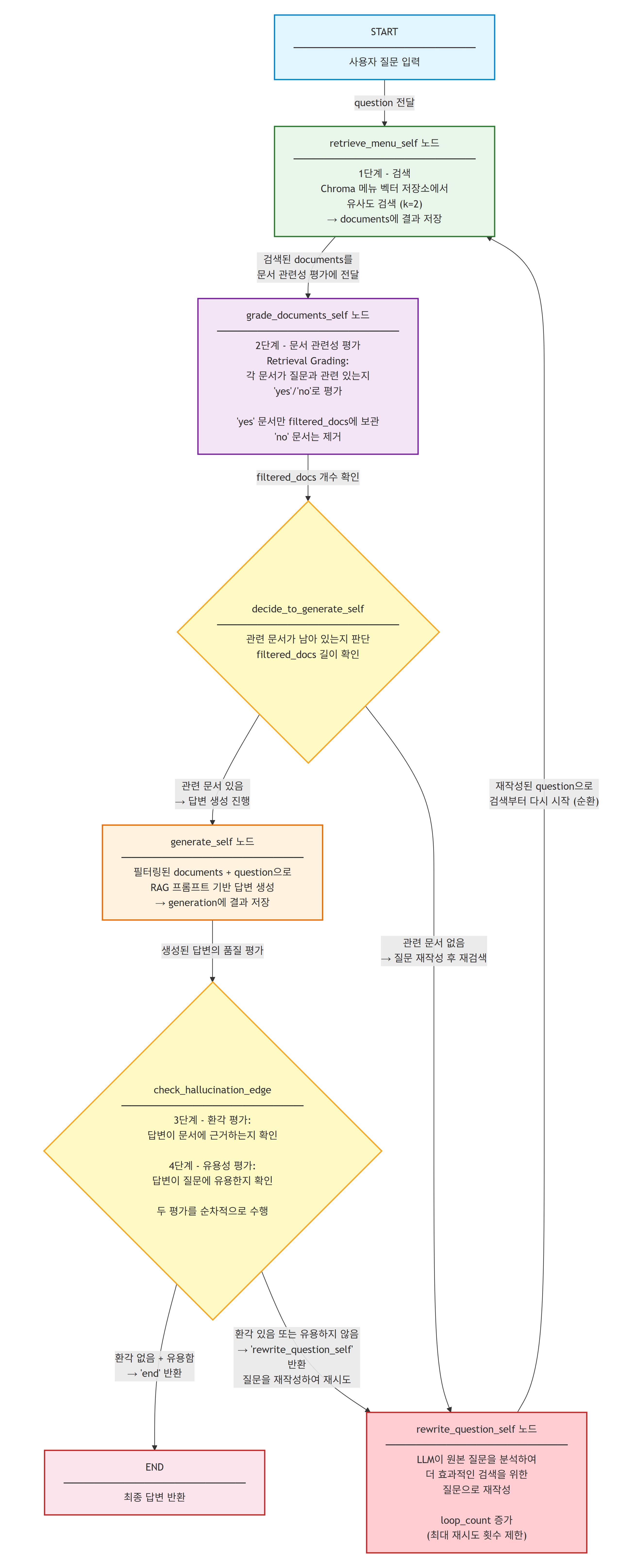
- Self-RAG의 전체 흐름은 다음과 같다: START → 검색(retrieve) → 문서 관련성 평가(grade_documents) → 조건부 분기(generate 또는 rewrite) → 생성(generate) → 환각 검사(check_hallucination) → 조건부 분기(END 또는 rewrite) → END
4.2.1. State
- Self-RAG의 상태는 Adaptive RAG의 상태에 `num_generations` 필드를 추가하여, 무한 루프를 방지하기 위한 재시도 횟수를 추적한다.
from typing import TypedDict, List
from langchain_core.documents import Document

class SelfRagState(TypedDict):
    question: str
    generation: str
    documents: List[Document]
    num_generations: int
- `num_generations` 필드는 답변 생성 시도 횟수를 기록한다. 환각이 감지되거나 유용하지 않은 답변이 생성될 때마다 질문을 재작성하고 다시 시도하는데, 이 횟수가 일정 값(예: 3)을 초과하면 루프를 강제로 종료한다.
- Self-RAG에서 순환 구조는 필수적이지만, 무한 루프는 반드시 방지해야 한다. `num_generations`가 없다면 검색 결과가 계속 불량한 경우 그래프가 영원히 순환할 수 있다.
4.2.2. Node
- Self-RAG 그래프의 네 가지 핵심 노드를 정의한다.
- 각 노드는 섹션 4.1에서 정의한 LLM 체인과 섹션 2.1의 검색 도구를 활용한다.
MAX_GENERATIONS = 3

def retrieve_menu_self(state: SelfRagState):
    """벡터 저장소에서 문서를 검색하는 노드"""
    question = state["question"]
    docs = search_menu.invoke(question)  # [사용자 정의 - 섹션 2.1 참조] search_menu 도구 호출
    return {"documents": docs, "question": question}

def grade_documents_self(state: SelfRagState):
    """검색된 문서의 관련성을 평가하여 필터링하는 노드"""
    question = state["question"]
    documents = state["documents"]

    filtered_docs = []
    for doc in documents:
        score = retrieval_grader.invoke(  # [사용자 정의 - 섹션 4.1.1 참조] retrieval_grader 체인 호출
            {"question": question, "document": doc.page_content}
        )
        if score.binary_score == "yes":
            print(f"  [관련 있음] {doc.page_content[:50]}...")
            filtered_docs.append(doc)
        else:
            print(f"  [관련 없음] {doc.page_content[:50]}...")

    return {"documents": filtered_docs, "question": question}

def generate_self(state: SelfRagState):
    """필터링된 문서를 기반으로 답변을 생성하는 노드"""
    question = state["question"]
    documents = state["documents"]
    num_generations = state.get("num_generations", 0)

    generation = generator_rag_answer(question, documents)  # [사용자 정의 - 섹션 4.1.2 참조] generator_rag_answer 함수 호출
    return {
        "generation": generation,
        "documents": documents,
        "question": question,
        "num_generations": num_generations + 1,
    }

def rewrite_question_self(state: SelfRagState):
    """질문을 재작성하는 노드"""
    question = state["question"]
    num_generations = state.get("num_generations", 0)

    new_question = rewrite_question(question)  # [사용자 정의 - 섹션 4.1.5 참조] rewrite_question 함수 호출
    print(f"  [질문 재작성] '{question}' → '{new_question}'")
    return {"question": new_question, "num_generations": num_generations + 1}
- `grade_documents_self`는 각 문서를 개별적으로 평가하여 관련 있는 문서만 `filtered_docs`에 추가한다. 관련 없는 문서는 제거되므로, 이후 생성 노드에서 노이즈 없는 깨끗한 컨텍스트를 사용할 수 있다.
- `generate_self`는 답변 생성 시마다 `num_generations`를 1 증가시켜, 이후 조건부 엣지에서 최대 재시도 횟수를 확인하는 데 사용한다.
4.2.3. Edge
- Self-RAG의 두 가지 조건부 엣지를 정의한다.
- `decide_to_generate_self`는 문서 관련성 평가 후 관련 문서가 있으면 `generate`로, 없으면 `rewrite_question`으로 분기한다.
- `check_hallucination_edge`는 생성된 답변의 환각 여부와 유용성을 평가하여 `END` 또는 `rewrite_question`으로 분기한다.
from typing import Literal

def decide_to_generate_self(state: SelfRagState) -> Literal["generate_self", "rewrite_question_self"]:
    """관련 문서가 있으면 생성, 없으면 질문 재작성"""
    documents = state["documents"]
    num_generations = state.get("num_generations", 0)

    if num_generations >= MAX_GENERATIONS:
        print("  [최대 재시도 초과] 현재 문서로 생성을 진행합니다.")
        return "generate_self"

    if len(documents) > 0:
        print("  [관련 문서 존재] 답변 생성을 진행합니다.")
        return "generate_self"
    else:
        print("  [관련 문서 없음] 질문을 재작성합니다.")
        return "rewrite_question_self"

def check_hallucination_edge(state: SelfRagState) -> Literal["end", "rewrite_question_self"]:
    """환각 검사 및 답변 유용성 평가"""
    documents = state["documents"]
    generation = state["generation"]
    question = state["question"]
    num_generations = state.get("num_generations", 0)

    if num_generations >= MAX_GENERATIONS:
        print("  [최대 재시도 초과] 현재 답변을 최종 답변으로 사용합니다.")
        return "end"

    # 1단계: 환각 검사
    docs_text = format_docs(documents)  # [사용자 정의 - 섹션 4.1.2 참조] format_docs 함수 호출
    hallucination_score = hallucination_grader.invoke(  # [사용자 정의 - 섹션 4.1.3 참조] hallucination_grader 체인 호출
        {"documents": docs_text, "generation": generation}
    )

    if hallucination_score.binary_score == "no":
        print("  [환각 감지] 질문을 재작성합니다.")
        return "rewrite_question_self"

    # 2단계: 답변 유용성 검사
    answer_score = answer_grader.invoke(  # [사용자 정의 - 섹션 4.1.4 참조] answer_grader 체인 호출
        {"question": question, "generation": generation}
    )

    if answer_score.binary_score == "yes":
        print("  [유용한 답변] 최종 답변으로 확정합니다.")
        return "end"
    else:
        print("  [유용하지 않은 답변] 질문을 재작성합니다.")
        return "rewrite_question_self"
- `check_hallucination_edge`는 두 단계 평가를 순차적으로 수행한다. 먼저 환각 여부를 검사하고, 환각이 없는 경우에만 유용성을 검사한다. 환각이 있는 답변은 유용성 검사를 할 필요가 없기 때문이다.
- 두 조건부 엣지 모두 `num_generations`가 `MAX_GENERATIONS`에 도달하면 현재 상태로 진행하여 무한 루프를 방지한다.
4.2.4. 그래프 연결
- 앞서 정의한 노드와 엣지를 연결하여 Self-RAG 그래프를 구성한다.
from langgraph.graph import StateGraph, START, END

# 그래프 생성
builder_self = StateGraph(SelfRagState)

# 노드 추가
builder_self.add_node("retrieve_menu_self", retrieve_menu_self)
builder_self.add_node("grade_documents_self", grade_documents_self)
builder_self.add_node("generate_self", generate_self)
builder_self.add_node("rewrite_question_self", rewrite_question_self)

# 엣지 추가
builder_self.add_edge(START, "retrieve_menu_self")
builder_self.add_edge("retrieve_menu_self", "grade_documents_self")

# 조건부 엣지: 문서 관련성 평가 후 분기
builder_self.add_conditional_edges(
    "grade_documents_self",
    decide_to_generate_self,
)

# 조건부 엣지: 환각 검사 후 분기
builder_self.add_conditional_edges(
    "generate_self",
    check_hallucination_edge,
    {"end": END, "rewrite_question_self": "rewrite_question_self"},
)

# 재작성 후 다시 검색
builder_self.add_edge("rewrite_question_self", "retrieve_menu_self")

# 그래프 컴파일
self_rag = builder_self.compile()
- `check_hallucination_edge`에서 `path_map`을 명시적으로 전달하는 이유는, 반환값 `"end"`와 실제 노드 `END`의 이름이 다르기 때문이다. `"end"` → `END`, `"rewrite_question_self"` → `"rewrite_question_self"`로 매핑한다.
- `rewrite_question_self` → `retrieve_menu_self` 엣지가 순환 구조를 형성한다. 질문이 재작성되면 다시 검색부터 시작하여 전체 평가 과정을 반복한다.
- Self-RAG 그래프 구조
4.2.5. 그래프 실행
- 이 코드는 섹션 4.2.1~4.2.4에서 정의한 `SelfRagState`, 노드 함수(`retrieve_menu_self`, `grade_documents_self`, `generate_self`, `rewrite_question_self`), 조건부 엣지 함수(`decide_to_generate_self`, `check_hallucination_edge`), 그리고 컴파일된 `self_rag` 그래프를 전제로 실행된다.
inputs = {"question": "이 식당의 대표 메뉴가 뭔가요?"}

for output in self_rag.stream(inputs):
    for key, value in output.items():
        print(f"\nNode '{key}':")
    print("\n---\n")

# 최종 결과 출력
print("=" * 60)
print("최종 답변:", value.get("generation", "답변 없음"))
Node 'retrieve_menu_self':
---
[관련 있음] 1. 시그니처 스테이크
• 가격: ₩35,000
• 주요 식재료...
[관련 있음] 2. 트러플 크림 파스타
• 가격: ₩28,000...
Node 'grade_documents_self':
---
[관련 문서 존재] 답변 생성을 진행합니다.
Node 'generate_self':
---
[유용한 답변] 최종 답변으로 확정합니다.
============================================================
최종 답변: 이 식당의 대표 메뉴는 '시그니처 스테이크'입니다.
주재료는 최상급 한우 등심, 로즈메리 감자이며 가격은 ₩35,000입니다.
또한 '트러플 크림 파스타'도 대표 메뉴로,
가격은 ₩28,000입니다.
- 실행 결과를 보면, 검색된 문서가 모두 관련 있다고 평가되었고, 생성된 답변도 환각 없이 유용하다고 판정되어 한 번의 순환 없이 바로 최종 답변이 확정되었다.
- 만약 검색된 문서가 관련 없거나 답변에 환각이 감지되면, 질문 재작성 → 재검색 → 재평가의 순환이 발생하며, 최대 3회까지 재시도된다.
4.3. 서브그래프 (Subgraphs)
- 서브그래프는 LangGraph에서 그래프를 모듈화하기 위한 핵심 메커니즘이다.
- 서브그래프의 주요 장점은 다음과 같다:
- 독립적 상태 관리: 서브그래프는 자체적인 상태 스키마를 가지며, 부모 그래프의 상태와 독립적으로 관리된다.
- 모듈화: 복잡한 로직을 작은 단위로 분리하여 재사용성과 유지보수성을 향상시킨다.
- 병렬 실행 지원: 여러 서브그래프를 동시에 실행하여 처리 속도를 향상시킬 수 있다.
4.3.1. 병렬 노드
- 병렬 노드는 여러 검색 도구를 동시에 실행하여 결과를 합치는 팬아웃/팬인(fan-out/fan-in) 패턴이다.
- `Annotated[List[Document], add]`를 사용하여 여러 노드에서 반환된 문서 리스트를 자동으로 합산(concatenate)한다.
- 이전 문서(03_LangGraph_Reducer)에서 학습한 Reducer 개념이 여기서 활용된다. `add` 연산자는 여러 노드의 출력을 하나의 리스트로 병합한다.
from typing import TypedDict, List, Annotated
from operator import add
from langchain_core.documents import Document

class SearchState(TypedDict):
    question: str
    documents: Annotated[List[Document], add]
- `Annotated[List[Document], add]`에서 `add`는 Python의 `operator.add`로, 리스트의 `+` 연산을 수행한다. 즉, 노드 A가 `[doc1, doc2]`를, 노드 B가 `[doc3]`을 반환하면, 상태의 `documents`는 `[doc1, doc2, doc3]`이 된다.
def search_menu_parallel(state: SearchState):
    """메뉴 검색 (병렬 실행용)"""
    question = state["question"]
    docs = search_menu.invoke(question)  # [사용자 정의 - 섹션 2.1 참조] search_menu 도구 호출
    print(f"  [메뉴 검색] {len(docs)}개 문서 검색됨")
    return {"documents": docs}

def search_wine_parallel(state: SearchState):
    """와인 검색 (병렬 실행용)"""
    question = state["question"]
    docs = search_wine.invoke(question)  # [사용자 정의 - 섹션 2.1 참조] search_wine 도구 호출
    print(f"  [와인 검색] {len(docs)}개 문서 검색됨")
    return {"documents": docs}

def search_web_parallel(state: SearchState):
    """웹 검색 (병렬 실행용)"""
    question = state["question"]
    docs = search_web.invoke(question)  # [사용자 정의 - 섹션 2.1 참조] search_web 도구 호출
    print(f"  [웹 검색] {len(docs)}개 문서 검색됨")
    return {"documents": docs}

def grade_documents_parallel(state: SearchState):
    """병렬 검색 결과를 통합한 후 관련성 평가로 필터링"""
    question = state["question"]
    documents = state["documents"]
    print(f"  [통합 문서] 총 {len(documents)}개 문서")

    filtered_docs = []
    for doc in documents:
        score = retrieval_grader.invoke(  # [사용자 정의 - 섹션 4.1.1 참조] retrieval_grader 체인 호출
            {"question": question, "document": doc.page_content}
        )
        if score.binary_score == "yes":
            filtered_docs.append(doc)

    print(f"  [필터링 결과] {len(filtered_docs)}개 문서 통과")
    return {"documents": filtered_docs}
from langgraph.graph import StateGraph, START, END
# 병렬 검색 서브그래프
search_builder = StateGraph(SearchState)
search_builder.add_node("search_menu_parallel", search_menu_parallel)
search_builder.add_node("search_wine_parallel", search_wine_parallel)
search_builder.add_node("search_web_parallel", search_web_parallel)
search_builder.add_node("grade_documents_parallel", grade_documents_parallel)
# START에서 세 검색 노드로 동시 분기 (fan-out)
search_builder.add_edge(START, "search_menu_parallel")
search_builder.add_edge(START, "search_wine_parallel")
search_builder.add_edge(START, "search_web_parallel")
# 세 검색 노드에서 grade_documents로 합류 (fan-in)
search_builder.add_edge("search_menu_parallel", "grade_documents_parallel")
search_builder.add_edge("search_wine_parallel", "grade_documents_parallel")
search_builder.add_edge("search_web_parallel", "grade_documents_parallel")
search_builder.add_edge("grade_documents_parallel", END)
# 서브그래프 컴파일
search_subgraph = search_builder.compile()result = search_subgraph.invoke({"question": "스테이크와 어울리는 와인은?"})
print(f"최종 문서 수: {len(result['documents'])}")
for doc in result["documents"]:
print(f" - {doc.page_content[:60]}...") [메뉴 검색] 2개 문서 검색됨
[와인 검색] 2개 문서 검색됨
[웹 검색] 2개 문서 검색됨
[통합 문서] 총 6개 문서
[필터링 결과] 4개 문서 통과
최종 문서 수: 4
- 1. 시그니처 스테이크
• 가격: ₩35,000
• 주요 식재료: 최상급 한우 등심...
- 카베르네 소비뇽 - 풀바디 레드 와인으로 스테이크와 잘 어울립니다...
...
- 병렬 검색 서브그래프 구조

4.3.2. 조건부 엣지로 병렬 노드 실행
- 모든 검색을 항상 병렬로 실행하는 것이 아니라, ToolSelector가 선택한 도구들만 동적으로 병렬 실행하는 고급 패턴이다.
- LangGraph의 `Send()` `[LangGraph 내장]` 함수를 사용하면 조건부 엣지에서 여러 노드로 동시에 분기할 수 있다.
- `Send(node_name, state)`는 지정된 노드를 주어진 상태로 실행하라는 명령으로, 여러 `Send` 객체를 리스트로 반환하면 해당 노드들이 병렬로 실행된다.
from typing import Literal, List as TypingList
from langgraph.types import Send  # [LangGraph 내장]

# 복수 도구 선택을 위한 Pydantic 모델
class MultiToolSelector(BaseModel):
    """Routes the user question to the most appropriate tool(s)."""
    tools: TypingList[Literal["search_menu", "search_wine", "search_web"]] = Field(
        description="Select one or more tools based on the user's question.",
    )

structured_llm_multi = llm.with_structured_output(MultiToolSelector)

multi_route_prompt = ChatPromptTemplate.from_messages(
    [
        ("system", """You are an AI assistant specializing in routing user questions to the appropriate tool(s).
You may select multiple tools if the question spans multiple domains.
- For restaurant menu questions, select search_menu.
- For wine-related questions, select search_wine.
- For other/latest information, select search_web.
Return all applicable tools."""),
        ("human", "{question}"),
    ]
)

multi_question_router = multi_route_prompt | structured_llm_multi

# 동적 팬아웃을 위한 조건부 엣지 함수
tool_node_map = {
    "search_menu": "search_menu_parallel",
    "search_wine": "search_wine_parallel",
    "search_web": "search_web_parallel",
}

def route_to_selected_tools(state: SearchState):
    """선택된 도구들에 대해 Send()를 사용한 동적 팬아웃"""
    question = state["question"]
    result = multi_question_router.invoke({"question": question})
    selected_tools = result.tools
    print(f"  [도구 선택] {selected_tools}")

    sends = []
    for tool_name in selected_tools:
        node_name = tool_node_map.get(tool_name)
        if node_name:
            sends.append(Send(node_name, {"question": question, "documents": []}))  # [LangGraph 내장] Send()

    return sends
# 동적 팬아웃 서브그래프
dynamic_builder = StateGraph(SearchState)
dynamic_builder.add_node("search_menu_parallel", search_menu_parallel)
dynamic_builder.add_node("search_wine_parallel", search_wine_parallel)
dynamic_builder.add_node("search_web_parallel", search_web_parallel)
dynamic_builder.add_node("grade_documents_parallel", grade_documents_parallel)
# 조건부 엣지로 동적 팬아웃
dynamic_builder.add_conditional_edges(START, route_to_selected_tools)
# 각 검색 노드에서 grade_documents로 합류 (fan-in)
dynamic_builder.add_edge("search_menu_parallel", "grade_documents_parallel")
dynamic_builder.add_edge("search_wine_parallel", "grade_documents_parallel")
dynamic_builder.add_edge("search_web_parallel", "grade_documents_parallel")
dynamic_builder.add_edge("grade_documents_parallel", END)
dynamic_search = dynamic_builder.compile()
# 스테이크+와인 질문 → search_menu + search_wine만 실행
result = dynamic_search.invoke({"question": "스테이크와 어울리는 와인을 추천해주세요"})
print(f"최종 문서 수: {len(result['documents'])}") [도구 선택] ['search_menu', 'search_wine']
[메뉴 검색] 2개 문서 검색됨
[와인 검색] 2개 문서 검색됨
[통합 문서] 총 4개 문서
[필터링 결과] 3개 문서 통과
최종 문서 수: 3
- ToolSelector가 질문을 분석하여 `search_menu`과 `search_wine`만 선택하였고, `search_web`은 실행되지 않았다. 이렇게 동적 팬아웃을 사용하면 필요한 검색만 수행하여 효율성을 높일 수 있다.
4.3.3. Self-RAG와 결합
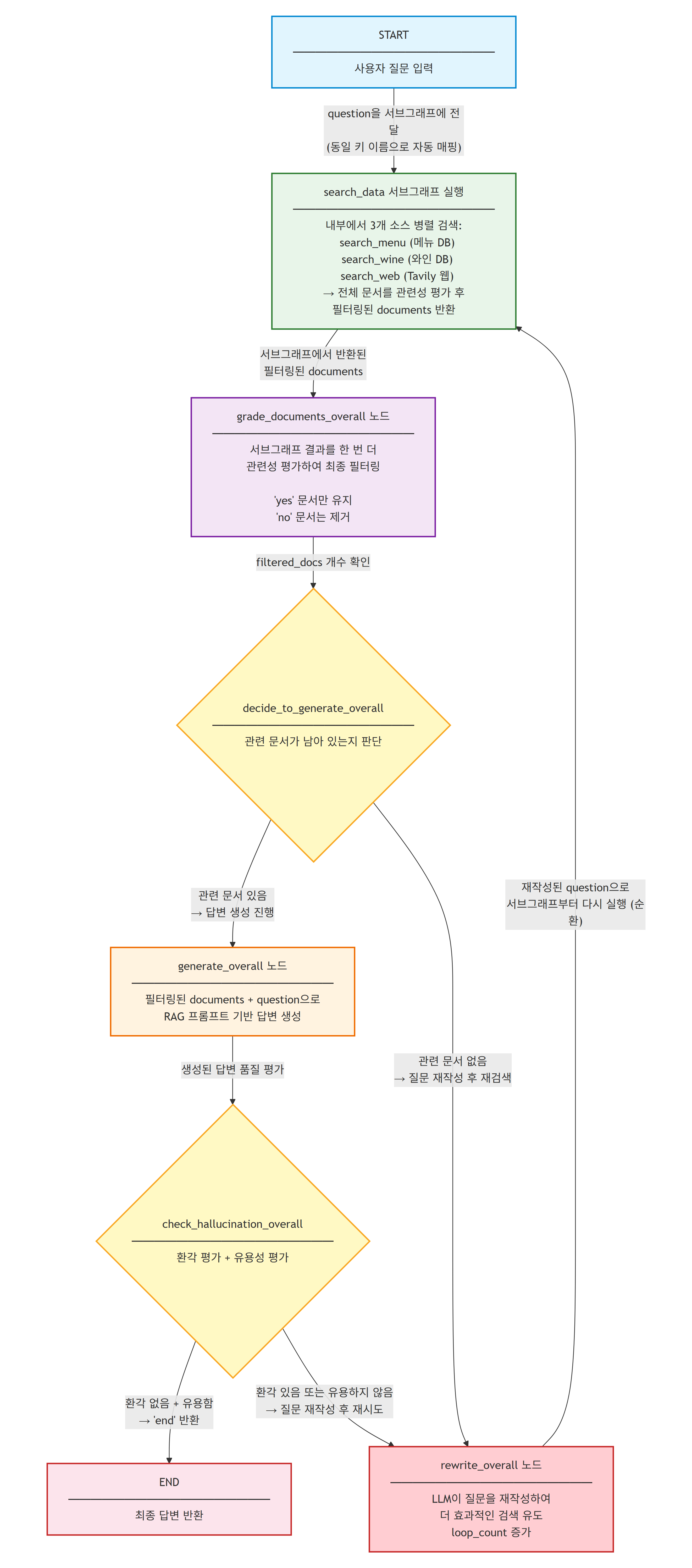
- 병렬 검색 서브그래프를 Self-RAG의 검색 노드로 등록하여, 복수 소스 병렬 검색과 자기 반성 평가를 결합한 고급 파이프라인을 구성한다.
- `SelfRagOverallState`는 `SelfRagState`의 모든 필드를 상속하면서 `documents`에 `add` 리듀서를 적용하여 병렬 검색 결과를 자동 병합한다.
- 아래 코드에서 사용되는 `retrieval_grader`(섹션 4.1.1), `generator_rag_answer`/`format_docs`(섹션 4.1.2), `hallucination_grader`(섹션 4.1.3), `answer_grader`(섹션 4.1.4), `rewrite_question`(섹션 4.1.5), `search_subgraph`(섹션 4.3.1)는 모두 이전 섹션에서 정의한 체인/함수/그래프이다.
class SelfRagOverallState(TypedDict):
    question: str
    generation: str
    documents: Annotated[List[Document], add]
    num_generations: int

def grade_documents_overall(state: SelfRagOverallState):
    """통합된 검색 결과에서 관련 문서만 필터링"""
    question = state["question"]
    documents = state["documents"]

    filtered_docs = []
    for doc in documents:
        score = retrieval_grader.invoke(  # [사용자 정의 - 섹션 4.1.1 참조]
            {"question": question, "document": doc.page_content}
        )
        if score.binary_score == "yes":
            filtered_docs.append(doc)

    print(f"  [필터링] {len(documents)}개 중 {len(filtered_docs)}개 관련 문서")
    # add 리듀서를 우회하여 필터링된 결과로 교체하기 위해
    # 기존 documents를 비우고 새로운 결과로 채운다
    return {"documents": filtered_docs}

def generate_overall(state: SelfRagOverallState):
    """필터링된 문서로 답변 생성"""
    question = state["question"]
    documents = state["documents"]
    num_generations = state.get("num_generations", 0)

    generation = generator_rag_answer(question, documents)  # [사용자 정의 - 섹션 4.1.2 참조]
    return {
        "generation": generation,
        "documents": documents,
        "question": question,
        "num_generations": num_generations + 1,
    }

def check_hallucination_overall(state: SelfRagOverallState) -> Literal["end", "rewrite"]:
    """환각 검사 및 유용성 평가"""
    documents = state["documents"]
    generation = state["generation"]
    question = state["question"]
    num_generations = state.get("num_generations", 0)

    if num_generations >= MAX_GENERATIONS:
        return "end"

    docs_text = format_docs(documents)  # [사용자 정의 - 섹션 4.1.2 참조]
    hallucination = hallucination_grader.invoke(  # [사용자 정의 - 섹션 4.1.3 참조]
        {"documents": docs_text, "generation": generation}
    )
    if hallucination.binary_score == "no":
        return "rewrite"

    answer = answer_grader.invoke(  # [사용자 정의 - 섹션 4.1.4 참조]
        {"question": question, "generation": generation}
    )
    if answer.binary_score == "yes":
        return "end"
    return "rewrite"

def rewrite_overall(state: SelfRagOverallState):
    """질문 재작성"""
    question = state["question"]
    num_generations = state.get("num_generations", 0)
    new_question = rewrite_question(question)  # [사용자 정의 - 섹션 4.1.5 참조]
    print(f"  [재작성] '{question}' → '{new_question}'")
    return {"question": new_question, "num_generations": num_generations + 1}
# Self-RAG + 서브그래프 결합
overall_builder = StateGraph(SelfRagOverallState)
# 서브그래프를 노드로 등록
overall_builder.add_node("search_data", search_subgraph) # [사용자 정의 - 섹션 4.3.1 참조] 병렬 검색 서브그래프
overall_builder.add_node("grade_documents_overall", grade_documents_overall)
overall_builder.add_node("generate_overall", generate_overall)
overall_builder.add_node("rewrite_overall", rewrite_overall)
# 엣지 연결
overall_builder.add_edge(START, "search_data")
overall_builder.add_edge("search_data", "grade_documents_overall")
overall_builder.add_conditional_edges(
"grade_documents_overall",
lambda state: "generate_overall" if len(state["documents"]) > 0 else "rewrite_overall",
)
overall_builder.add_conditional_edges(
"generate_overall",
check_hallucination_overall,
{"end": END, "rewrite": "rewrite_overall"},
)
overall_builder.add_edge("rewrite_overall", "search_data")
self_rag_overall = overall_builder.compile()inputs = {"question": "스테이크와 어울리는 와인을 추천해주세요. 가격도 알려주세요."}
for output in self_rag_overall.stream(inputs, subgraphs=True):
node_name = list(output[1].keys())[0] if isinstance(output[1], dict) else str(output[1])
print(f" 실행 중: {node_name}")
# 최종 결과
result = self_rag_overall.invoke(inputs)
print("\n" + "=" * 60)
print("최종 답변:", result.get("generation", "답변 없음"))실행 중: search_menu_parallel
실행 중: search_wine_parallel
실행 중: search_web_parallel
실행 중: grade_documents_parallel
실행 중: grade_documents_overall
실행 중: generate_overall
============================================================
최종 답변: 시그니처 스테이크의 가격은 ₩35,000입니다.
스테이크와 어울리는 와인으로는 카베르네 소비뇽을 추천드립니다.
풀바디 레드 와인으로 스테이크의 풍미와 잘 어울리며,
풀리니 몽라쉐 화이트 와인도 좋은 선택입니다.
- 병렬 검색 서브그래프가 메뉴, 와인, 웹 세 소스에서 동시에 검색하고, 그 결과를 통합하여 Self-RAG의 평가 파이프라인을 거쳐 최종 답변을 생성하였다.
- 서브그래프를 `add_node`로 등록하면 LangGraph가 자동으로 서브그래프의 입력/출력 상태를 부모 그래프의 상태와 매핑한다. 동일한 키 이름(question, documents)을 사용하므로 별도의 매핑 설정 없이 자연스럽게 연결된다.
- 서브그래프 통합 Agentic RAG 구조
5. Corrective RAG (CRAG) 구현
- 이 섹션은 Corrective RAG(CRAG) 패턴을 구현한다. CRAG는 Yan et al.이 2024년 논문(https://arxiv.org/pdf/2401.15884)에서 제안한 패턴이다.
- CRAG는 Self-RAG와 마찬가지로 검색된 문서의 품질을 평가하지만, 접근 방식이 다르다:
- Self-RAG: 관련 없는 문서 → 질문 재작성 → 같은 소스에서 재검색
- CRAG: 관련 없는 문서 → 지식 정제(Knowledge Refining) → 정제 실패 시 웹 검색으로 폴백
- CRAG의 전체 흐름은 다음과 같다:
- 1단계 - 검색: 벡터 저장소에서 문서를 검색한다.
- 2단계 - 평가: 검색된 문서를 correct/incorrect/ambiguous로 3단계 평가한다.
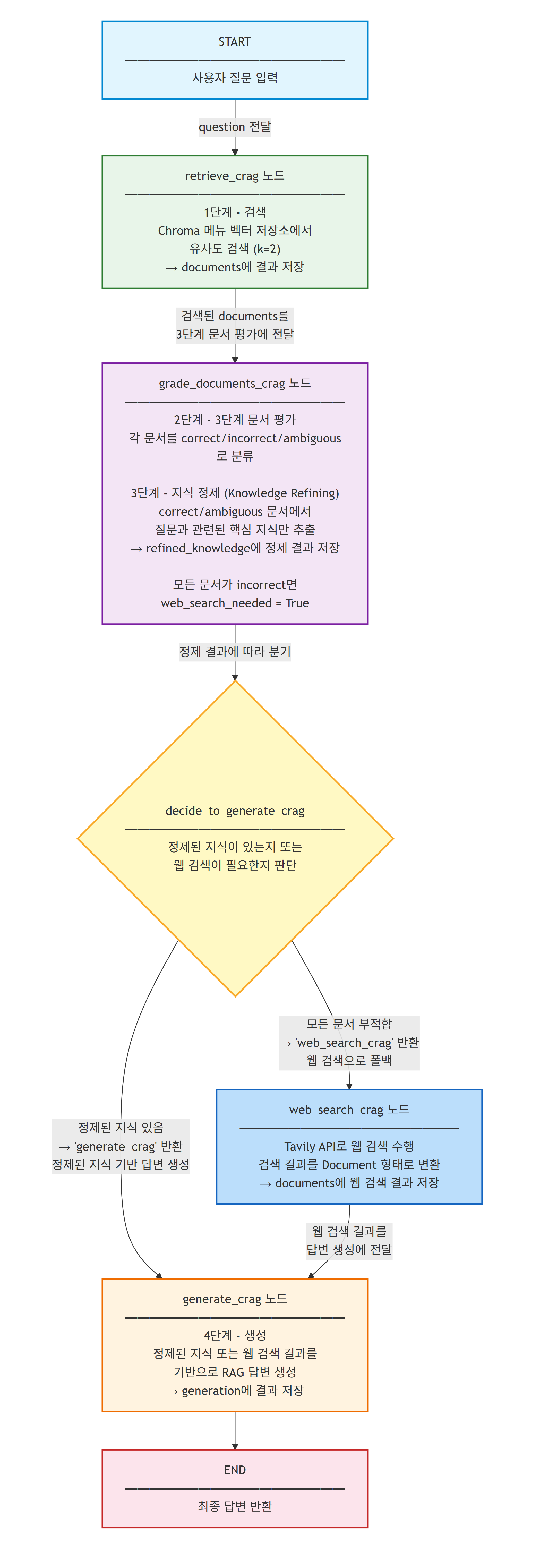
- 3단계 - 지식 정제 또는 웹 검색: correct/ambiguous 문서는 지식 정제(Knowledge Refining)를 수행하고, 모든 문서가 incorrect인 경우 웹 검색으로 폴백한다.
- 4단계 - 생성: 정제된 지식 또는 웹 검색 결과를 기반으로 답변을 생성한다.
5.1. LLM 체인 추가
- CRAG에서 추가로 필요한 LLM 체인을 정의한다. 기존 Self-RAG의 체인(Answer Generator, Hallucination Grader 등)은 그대로 재사용하며, 문서 평가 방식과 지식 정제 체인만 새로 정의한다.
5.1.1. Knowledge Refiner
- Knowledge Refiner는 검색된 문서에서 질문과 관련된 핵심 지식만 추출하는 체인이다.
- CRAG 논문에서 제안한 지식 정제(Knowledge Refining)는 문서 전체를 그대로 사용하는 것이 아니라, 문서를 지식 조각(Knowledge Strips)으로 분해하고, 각 조각의 관련성을 평가하여 관련 있는 조각만 사용하는 기법이다.
from pydantic import BaseModel, Field

class RefinedKnowledge(BaseModel):
    """A refined piece of knowledge extracted from a document."""
    knowledge_strip: str = Field(
        description="A refined piece of knowledge relevant to the question"
    )
    binary_score: str = Field(
        description="Relevance score, 'yes' or 'no'"
    )

structured_llm_refiner = llm.with_structured_output(RefinedKnowledge)  # [LangChain 내장] with_structured_output()

refine_prompt = ChatPromptTemplate.from_messages(  # [LangChain 내장]
    [
        ("system", """You are a knowledge refiner. Given a document and a question,
extract the most relevant piece of knowledge from the document that helps answer the question.
If the document contains relevant information, set binary_score to 'yes' and extract the key knowledge.
If the document is not relevant, set binary_score to 'no' and set knowledge_strip to empty string."""),
        ("human", "Document:\n\n{document}\n\nQuestion: {question}"),
    ]
)

# [사용자 정의] Knowledge Refiner 체인 생성 - CRAG 논문의 지식 정제 개념 구현
knowledge_refiner = refine_prompt | structured_llm_refiner
result = knowledge_refiner.invoke({
"question": "스테이크 가격은?",
"document": "1. 시그니처 스테이크\n • 가격: ₩35,000\n • 주요 식재료: 최상급 한우 등심"
})
print(f"관련성: {result.binary_score}")
print(f"정제된 지식: {result.knowledge_strip}")관련성: yes
정제된 지식: 시그니처 스테이크의 가격은 ₩35,000입니다.
- 문서 전체가 아닌 질문에 직접 관련된 핵심 정보만 추출되었다. 이렇게 정제된 지식은 답변 생성 시 더 정확한 컨텍스트를 제공한다.
5.1.2. Retrieval Grader 수정
- CRAG에서는 문서 관련성을 이진 분류(yes/no)가 아닌 3단계(correct/incorrect/ambiguous)로 평가한다.
- `correct`는 명확히 관련 있는 문서, `incorrect`는 명확히 관련 없는 문서, `ambiguous`는 부분적으로 관련 있거나 판단이 어려운 문서를 의미한다.
from typing import Literal

class MultiGradeDocuments(BaseModel):
    """Three-level score for relevance check on retrieved documents."""
    score: Literal["correct", "incorrect", "ambiguous"] = Field(
        description="Document relevance to the question: 'correct', 'incorrect', or 'ambiguous'"
    )

structured_llm_multi_grader = llm.with_structured_output(MultiGradeDocuments)  # [LangChain 내장] with_structured_output()

multi_grade_prompt = ChatPromptTemplate.from_messages(  # [LangChain 내장]
    [
        ("system", """You are a grader assessing the relevance of a retrieved document to a user question.
Evaluate the document and assign one of three scores:
- 'correct': The document clearly contains information relevant to answering the question.
- 'incorrect': The document is clearly not relevant to the question.
- 'ambiguous': The document may contain partially relevant information or relevance is uncertain."""),
        ("human", "Retrieved document:\n\n{document}\n\nUser question: {question}"),
    ]
)

# [사용자 정의] 3단계 Retrieval Grader 체인 생성 - Self-RAG의 이진 분류(섹션 4.1.1)를 CRAG용 3단계 분류로 확장
multi_retrieval_grader = multi_grade_prompt | structured_llm_multi_grader
# correct 문서 테스트
result = multi_retrieval_grader.invoke({
"question": "스테이크 가격은?",
"document": "시그니처 스테이크 • 가격: ₩35,000"
})
print(f"평가: {result.score}")
# ambiguous 문서 테스트
result = multi_retrieval_grader.invoke({
"question": "스테이크 가격은?",
"document": "메뉴 가격은 시즌에 따라 변동될 수 있습니다."
})
print(f"평가: {result.score}")
# incorrect 문서 테스트
result = multi_retrieval_grader.invoke({
"question": "스테이크 가격은?",
"document": "레스토랑 주차장은 건물 뒤편에 있습니다."
})
print(f"평가: {result.score}")평가: correct
평가: ambiguous
평가: incorrect
- 3단계 평가를 통해 `ambiguous` 문서도 지식 정제 후 활용할 수 있으므로, 이진 분류 대비 정보 손실을 줄일 수 있다.
5.2. LangGraph로 그래프 구현
- CRAG의 전체 흐름을 LangGraph로 구현한다: START → 검색(retrieve) → 문서 평가(grade_documents) → 지식 정제(refine_knowledge) 또는 웹 검색(web_search) → 답변 생성(generate) → END
5.2.1. State
- CRAG 상태는 `MessagesState` `[LangGraph 내장]`를 상속하여 대화 히스토리를 지원하면서, CRAG 고유 필드를 추가한다.
from langgraph.graph import MessagesState  # [LangGraph 내장]
from typing import TypedDict, List

class CorrectiveRagState(MessagesState):  # [LangGraph 내장] MessagesState 상속
    question: str
    retrieved_documents: List[Document]
    knowledge_strips: List[str]
    generation: str
    search_performed: bool
- `retrieved_documents`: 벡터 저장소에서 검색된 원본 문서 리스트
- `knowledge_strips`: 지식 정제를 통해 추출된 핵심 지식 문자열 리스트
- `generation`: 최종 생성된 답변
- `search_performed`: 웹 검색이 수행되었는지 여부를 추적하는 플래그
- `MessagesState`를 상속하는 이유는 CRAG가 대화형 인터페이스에서도 사용될 수 있도록 확장성을 확보하기 위함이다.
5.2.2. Node
- 각 노드는 섹션 2.1의 검색 도구와 섹션 5.1에서 정의한 CRAG 전용 체인을 활용한다.
def retrieve_crag(state: CorrectiveRagState):
    """벡터 저장소에서 문서를 검색하는 노드"""
    question = state["question"]
    docs = search_menu.invoke(question)  # [사용자 정의 - 섹션 2.1 참조] search_menu 도구 호출
    print(f"  [검색] {len(docs)}개 문서 검색됨")
    return {"retrieved_documents": docs, "question": question, "search_performed": False}

def grade_documents_crag(state: CorrectiveRagState):
    """검색된 문서를 3단계(correct/incorrect/ambiguous)로 평가하고 지식 정제를 수행"""
    question = state["question"]
    documents = state["retrieved_documents"]

    knowledge_strips = []
    all_incorrect = True

    for doc in documents:
        grade = multi_retrieval_grader.invoke(  # [사용자 정의 - 섹션 5.1.2 참조] multi_retrieval_grader 체인 호출
            {"question": question, "document": doc.page_content}
        )
        print(f"  [평가: {grade.score}] {doc.page_content[:50]}...")

        if grade.score in ("correct", "ambiguous"):
            all_incorrect = False
            # 지식 정제 수행
            refined = knowledge_refiner.invoke(  # [사용자 정의 - 섹션 5.1.1 참조] knowledge_refiner 체인 호출
                {"question": question, "document": doc.page_content}
            )
            if refined.binary_score == "yes" and refined.knowledge_strip:
                knowledge_strips.append(refined.knowledge_strip)
                print(f"    → 정제된 지식: {refined.knowledge_strip[:50]}...")

    if all_incorrect:
        print("  [모든 문서 부적합] 웹 검색으로 전환합니다.")

    return {
        "knowledge_strips": knowledge_strips,
        "search_performed": all_incorrect,
    }

def web_search_crag(state: CorrectiveRagState):
    """웹 검색을 수행하여 추가 지식을 확보하는 노드"""
    question = state["question"]
    print(f"  [웹 검색] '{question}'")
    docs = search_web.invoke(question)  # [사용자 정의 - 섹션 2.1 참조] search_web 도구 호출
    web_knowledge = [doc.page_content for doc in docs if hasattr(doc, "page_content")]
    print(f"  [웹 검색 결과] {len(web_knowledge)}개 결과")

    return {"knowledge_strips": web_knowledge}

def generate_crag(state: CorrectiveRagState):
    """정제된 지식 또는 웹 검색 결과를 기반으로 답변을 생성하는 노드"""
    question = state["question"]
    knowledge_strips = state.get("knowledge_strips", [])

    if not knowledge_strips:
        generation = "죄송합니다. 질문에 답변할 수 있는 충분한 정보를 찾지 못했습니다."
        return {"generation": generation}

    context = "\n\n".join(knowledge_strips)
    template = """You are an assistant answering questions based on refined knowledge.
Use the following knowledge to answer the question accurately and concisely.

Knowledge:
{context}

Question: {question}

Answer:"""

    prompt = ChatPromptTemplate.from_template(template)  # [LangChain 내장]
    chain = prompt | llm | StrOutputParser()  # [LangChain 내장] StrOutputParser
    generation = chain.invoke({"context": context, "question": question})

    return {"generation": generation}
- `grade_documents_crag`가 CRAG의 핵심 노드이다. 문서 평가와 지식 정제를 한 노드에서 수행하며, 모든 문서가 `incorrect`인 경우 `search_performed`를 `True`로 설정하여 웹 검색으로의 전환을 신호한다.
- `correct`와 `ambiguous` 문서 모두 지식 정제를 수행하여, 부분적으로라도 관련 있는 정보를 최대한 활용한다.
5.2.3. Edge
def decide_to_generate_crag(state: CorrectiveRagState) -> Literal["generate_crag", "web_search_crag"]:
    """지식 정제 결과에 따라 생성 또는 웹 검색으로 분기"""
    knowledge_strips = state.get("knowledge_strips", [])
    search_performed = state.get("search_performed", False)

    if search_performed or len(knowledge_strips) == 0:
        print("  [분기] 웹 검색으로 전환")
        return "web_search_crag"
    else:
        print(f"  [분기] {len(knowledge_strips)}개 정제된 지식으로 답변 생성")
        return "generate_crag"
- `search_performed`가 `True`이면 모든 문서가 부적합하다고 판단된 것이므로 웹 검색을 수행한다.
- `knowledge_strips`가 비어 있는 경우도 웹 검색으로 전환한다. `correct`/`ambiguous` 문서가 있더라도 지식 정제에서 관련 지식을 추출하지 못할 수 있기 때문이다.
5.2.4. 그래프 연결
from langgraph.graph import StateGraph, START, END  # [LangGraph 내장] StateGraph

# CRAG 그래프 생성
builder_crag = StateGraph(CorrectiveRagState)  # [LangGraph 내장] StateGraph

# 노드 추가
builder_crag.add_node("retrieve_crag", retrieve_crag)
builder_crag.add_node("grade_documents_crag", grade_documents_crag)
builder_crag.add_node("web_search_crag", web_search_crag)
builder_crag.add_node("generate_crag", generate_crag)

# 엣지 연결
builder_crag.add_edge(START, "retrieve_crag")
builder_crag.add_edge("retrieve_crag", "grade_documents_crag")

# 조건부 엣지: 지식 정제 결과에 따라 분기
builder_crag.add_conditional_edges(
    "grade_documents_crag",
    decide_to_generate_crag,
)

# 웹 검색 후 생성으로 연결
builder_crag.add_edge("web_search_crag", "generate_crag")
builder_crag.add_edge("generate_crag", END)

# 그래프 컴파일
corrective_rag = builder_crag.compile()
- Corrective RAG 그래프 구조
5.2.5. 그래프 실행
- 이 코드는 섹션 5.2.1~5.2.4에서 정의한 `CorrectiveRagState`, 노드 함수(`retrieve_crag`, `grade_documents_crag`, `web_search_crag`, `generate_crag`), 조건부 엣지 함수(`decide_to_generate_crag`), 그리고 컴파일된 `corrective_rag` 그래프를 전제로 실행된다.
# 메뉴 관련 질문 - 벡터 저장소에서 답변 가능
inputs = {"question": "스테이크 메뉴의 가격은 얼마인가요?"}

for output in corrective_rag.stream(inputs):
    for key, value in output.items():
        print(f"\nNode '{key}':")
    print("\n---\n")

print("=" * 60)
print("최종 답변:", value.get("generation", "답변 없음"))
[검색] 2개 문서 검색됨
Node 'retrieve_crag':
---
[평가: correct] 1. 시그니처 스테이크
• 가격: ₩35,000
• 주요 식재료...
→ 정제된 지식: 시그니처 스테이크의 가격은 ₩35,000입니다.
[평가: ambiguous] 2. 트러플 크림 파스타
• 가격: ₩28,000...
Node 'grade_documents_crag':
---
[분기] 1개 정제된 지식으로 답변 생성
Node 'generate_crag':
---
============================================================
최종 답변: 스테이크 메뉴의 가격은 ₩35,000입니다.# 벡터 저장소에 없는 정보 - 웹 검색으로 폴백
inputs = {"question": "2024년 미슐랭 가이드 서울 3스타 레스토랑은?"}
for output in corrective_rag.stream(inputs):
for key, value in output.items():
print(f"\nNode '{key}':")
print("\n---\n")
print("=" * 60)
print("최종 답변:", value.get("generation", "답변 없음")) [검색] 2개 문서 검색됨
Node 'retrieve_crag':
---
[평가: incorrect] 1. 시그니처 스테이크 ...
[평가: incorrect] 2. 트러플 크림 파스타 ...
[모든 문서 부적합] 웹 검색으로 전환합니다.
Node 'grade_documents_crag':
---
[분기] 웹 검색으로 전환
[웹 검색] '2024년 미슐랭 가이드 서울 3스타 레스토랑은?'
[웹 검색 결과] 2개 결과
Node 'web_search_crag':
---
Node 'generate_crag':
---
============================================================
최종 답변: 2024년 미슐랭 가이드 서울에서 3스타를 받은 레스토랑은 ...
- 메뉴 관련 질문은 벡터 저장소에서 문서가 `correct`로 평가되어 지식 정제 후 바로 답변이 생성되었다.
- 미슐랭 가이드 질문은 벡터 저장소의 문서가 모두 `incorrect`로 평가되어 웹 검색으로 폴백하였고, 웹 검색 결과를 기반으로 답변이 생성되었다.
- 이것이 CRAG의 핵심 가치이다. 검색된 문서의 품질을 평가하고, 품질이 미달하면 자동으로 대체 경로(웹 검색)를 통해 정보를 확보하여, 어떤 질문에도 최선의 답변을 생성할 수 있다.
- 정리: 세 가지 고급 RAG 패턴 비교
- 본 문서에서 다룬 Adaptive RAG, Self-RAG, Corrective RAG(CRAG)의 핵심 차이점을 비교하면 다음과 같다.
| 구분 | Adaptive RAG | Self-RAG | Corrective RAG (CRAG) |
| 핵심 아이디어 | 질문 유형별 동적 라우팅 | 자기 반성 기반 품질 평가 | 문서 품질 보정 + 웹 폴백 |
| 문서 평가 | 없음 (라우팅에 집중) | 이진 분류 (yes/no) | 3단계 분류 (correct/incorrect/ambiguous) |
| 환각 검사 | 없음 | 있음 (HallucinationGrader) | 없음 (지식 정제로 대체) |
| 보정 전략 | LLM 폴백 | 질문 재작성 → 재검색 | 지식 정제 → 웹 검색 폴백 |
| 순환 구조 | 없음 (단방향) | 있음 (재작성→재검색 루프) | 없음 (단방향) |
| 적합한 시나리오 | 다중 도메인 검색, | 높은 답변 정확도가 | 내부 DB + 외부 소스 결합, |
| 빠른 응답 필요 | 필수인 경우 | 정보 신뢰성 중요 | |
| LangGraph 핵심 개념 | conditional_edges, | 순환 그래프, | Knowledge Refining, |
| Structured Output, | 조건부 엣지 체인, | 3단계 평가, | |
| interrupt()+Command(resume) | 서브그래프, Send() | 웹 검색 폴백 |
- 세 패턴은 상호 배타적이지 않으며, 실무에서는 이들을 결합하여 사용하는 것이 일반적이다. 예를 들어, Adaptive RAG의 라우팅 + Self-RAG의 환각 검사 + CRAG의 웹 검색 폴백을 하나의 그래프에 통합할 수 있다.
- 다음 문서(06_LangGraph_Legal_PDF_QA_Project.md)에서는 본 문서에서 학습한 고급 RAG 패턴들을 실무 프로젝트에 적용하여, 법률 PDF 문서에 대한 질의응답 시스템을 구축한다.
'Study > LangChain' 카테고리의 다른 글
| 6. LangGraph - LangGraph 법률 PDF QA 종합 프로젝트 (0) | 2026.05.10 |
|---|---|
| 4. LangGraph - LangGraph ReAct Agent와 MemorySaver 학습 매뉴얼 (0) | 2026.05.05 |
| 3. LangGraph - LangGraph State Reducer & 메시지 상태 관리 학습 매뉴얼 (0) | 2026.05.04 |
| 2. LangGraph - StateGraph 상태 기반 그래프 (0) | 2026.05.03 |
| 1. LangGraph - LangChain Tool Calling 학습 매뉴얼 (0) | 2026.03.24 |

댓글